

Overview
This document explains how data flows between your system (Merchant Website), HitPay’s services, and payment method providers during a typical payment transaction. All communications use HTTPS (TLS 1.3) to ensure data is encrypted in transit.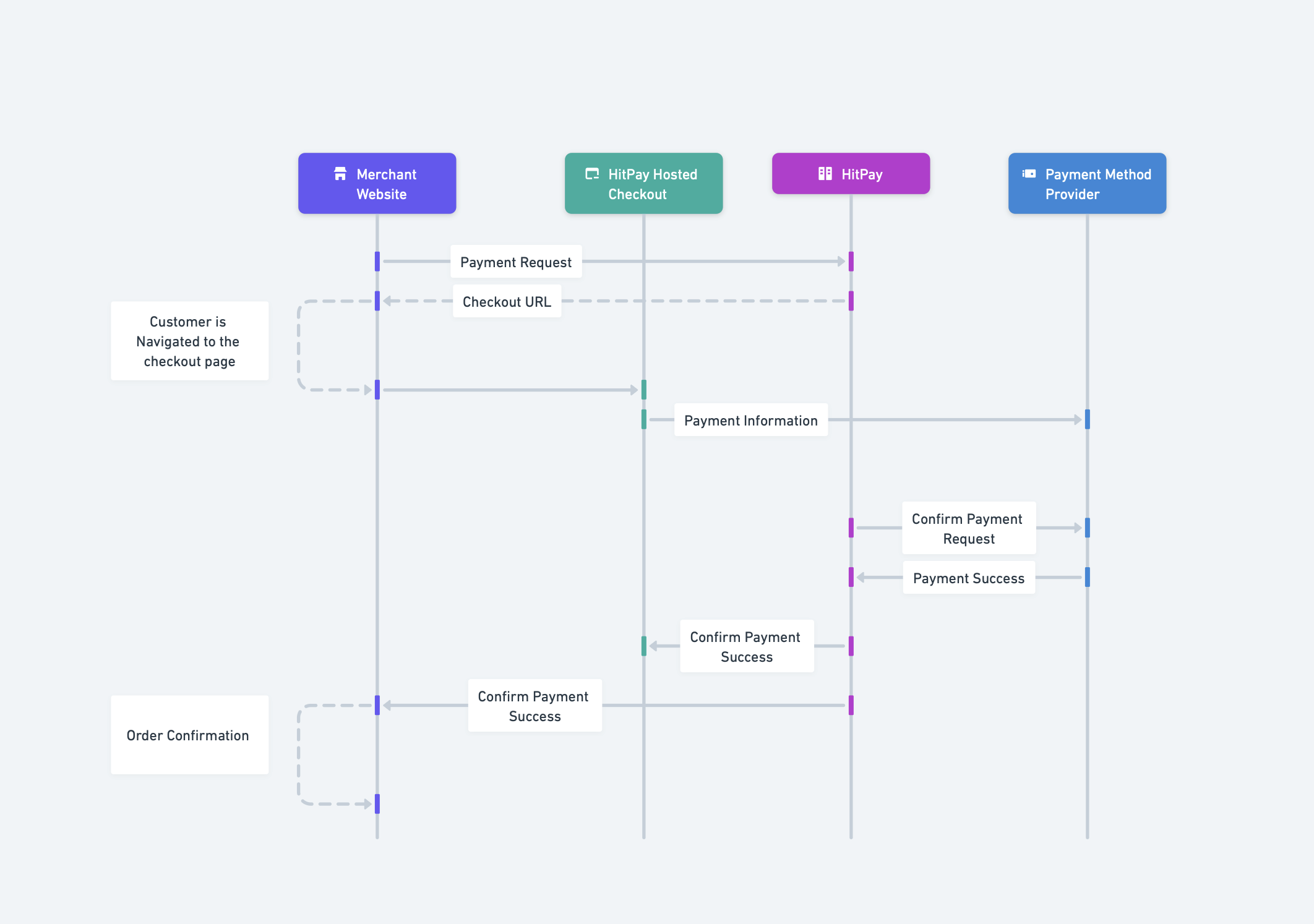
Communication Protocol
All API communications between your system and HitPay are secured using:- HTTPS (TLS 1.3): All data transmitted between systems is encrypted
- AES Encryption: Sensitive data at rest is encrypted using AES
- HMAC-SHA256: Webhook signatures ensure data integrity and authenticity
HitPay is PCI-DSS compliant. Sensitive payment information (card numbers, CVV) never touches your servers when using the hosted checkout or Drop-In UI.
Participants
The payment flow involves four main participants:Data Flow Explained
Payment Request
Your server sends a payment request to HitPay via HTTPS. HitPay validates the request, creates a payment record, and returns a secure checkout URL where your customer will complete the payment.Customer Checkout
The customer is redirected to HitPay’s secure hosted checkout page where they select a payment method and enter their payment details.Payment Processing
HitPay securely transmits the payment information to the relevant payment method provider (banks, card networks, or e-wallets). The provider processes the transaction and returns an authorization response to HitPay.Payment Confirmation
Once the payment is confirmed, HitPay notifies your system via a webhook (server-to-server POST request) and redirects the customer back to your website. The webhook contains the payment status and transaction details, signed with HMAC-SHA256 for authenticity verification.Data Flow Summary
Security Considerations
What data does HitPay store?
What data does HitPay store?
HitPay stores transaction records including:
- Payment request details (amount, currency, reference numbers)
- Customer contact information (email, phone) if provided
- Payment status and timestamps
- Tokenized payment method references (not raw card numbers)
What data is NOT sent to HitPay?
What data is NOT sent to HitPay?
The following data stays on your system:
- Customer passwords or authentication credentials
- Full customer profiles or purchase history
- Product inventory or catalog details
- Internal business logic or pricing rules
How is my API key protected?
How is my API key protected?
- API keys should only be stored on your server, never in client-side code
- All API requests use HTTPS to encrypt the API key in transit
- Rotate API keys periodically from your dashboard
- Use separate API keys for sandbox and production environments
How do I verify webhook authenticity?
How do I verify webhook authenticity?
Every webhook includes an If the signatures match, the webhook is authentic and has not been tampered with.
Hitpay-Signature header containing an HMAC-SHA256 hash. Compute the hash of the payload using your salt value and compare:Related Documentation
Security Overview
Learn about HitPay’s security practices and compliance certifications
Online Payments Guide
Step-by-step integration guide for online payments