> ## Documentation Index
> Fetch the complete documentation index at: https://docs.hitpayapp.com/llms.txt
> Use this file to discover all available pages before exploring further.
# Cashier Role Restrictions
> Learn how to configure and manage cashier role restrictions in HitPay to control access permissions for your team members, including refund capabilities and transaction viewing rights.
## Overview
The **Cashier** role is the most restricted permission level in HitPay's user management system. As a business owner or admin, you can customize cashier permissions to protect sensitive data while allowing essential operational functions.
### Key Restriction Areas
Cashier permissions can be controlled in two main areas:
1. **Refund Operations** - Control whether cashiers can process refunds
2. **Transaction & Report Access** - Limit visibility of transaction data and reports
***
## Refund Restrictions
 ### Restricting Refund Access
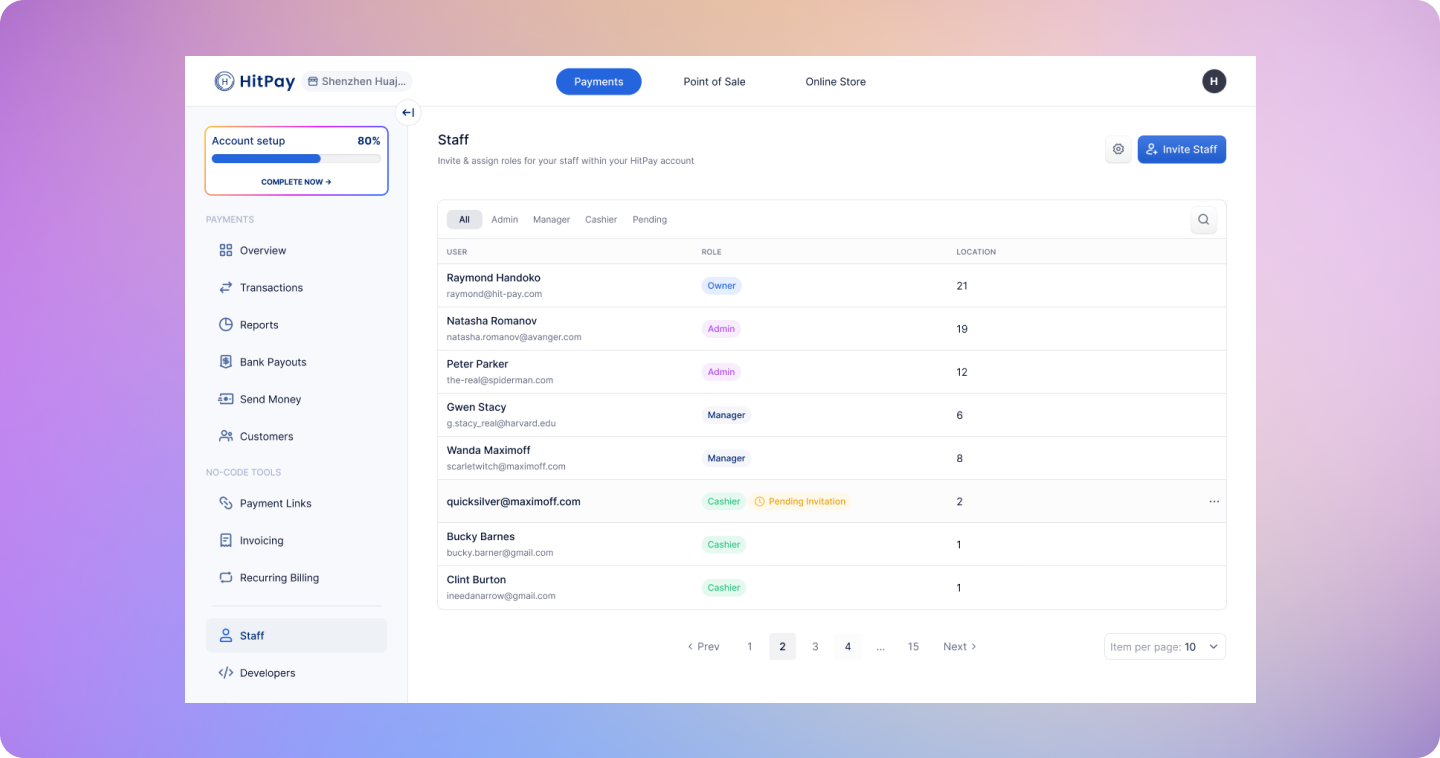
By default, cashiers have the ability to process refunds. However, you can restrict this capability to protect your business from unauthorized refunds.
#### How to Enable Refund Restrictions
1. Navigate to **Settings** → **Staff**
2. Click the **Settings icon** next to the cashier's name
3. Select **Role Restrictions**
4. Enable **"Restrict refund"**
#### What Happens When Restricted
When refund restrictions are enabled:
* Cashiers will receive an **"Unauthorized"** error when attempting to process refunds
* The refund option will be hidden or disabled in their interface
* Only users with higher permission levels (Admin/Owner) can process refunds
### Business PIN Override System
For businesses that need cashiers to process refunds occasionally while maintaining security, HitPay offers a Business PIN override system.
#### Setting Up Business PIN
1. **Admin/Owner Setup:**
* Go to **Settings** → **Staff** → **Role Restrictions**
* Create a **4-digit Business PIN code**
* Enable the PIN requirement for restricted operations
2. **PIN Usage:**
* When a restricted cashier attempts a refund, they'll be prompted to enter the 4-digit PIN
* Upon successful PIN entry, the refund operation will be authorized
* The PIN is shared among all staff members for restricted operations
#### Security Benefits
* **Controlled Access:** Only authorized personnel with the PIN can override restrictions
* **Audit Trail:** All PIN-authorized actions are logged for security monitoring
* **Flexible Control:** PIN can be changed or disabled at any time by admins
***
## Transaction & Report Access Restrictions
### Limiting Transaction Visibility
You can control how much transaction data cashiers can view and access.
#### Restriction Options
1. **Full Restriction:**
* Cashiers have **no access** to transaction data
* Cannot view daily collection totals
* Cannot export transaction reports
* Cannot access transaction history
2. **Limited Access:**
* Cashiers can view only the **last few transactions**
* Limited to recent activity only
* Cannot access historical data or reports
#### How to Configure
1. Navigate to **Settings** → **Staff**
2. Click the **Settings icon** next to the cashier's name
3. Select **Role Restrictions**
4. Choose your preferred transaction access level:
* **"No Access"** - Complete restriction
* **"Limited Access"** - Recent transactions only
### What Cashiers Cannot Access When Restricted
* Daily collection summaries
* Transaction export functionality
* Historical transaction reports
* Financial analytics and insights
* Customer transaction history
### Restricting Refund Access
By default, cashiers have the ability to process refunds. However, you can restrict this capability to protect your business from unauthorized refunds.
#### How to Enable Refund Restrictions
1. Navigate to **Settings** → **Staff**
2. Click the **Settings icon** next to the cashier's name
3. Select **Role Restrictions**
4. Enable **"Restrict refund"**
#### What Happens When Restricted
When refund restrictions are enabled:
* Cashiers will receive an **"Unauthorized"** error when attempting to process refunds
* The refund option will be hidden or disabled in their interface
* Only users with higher permission levels (Admin/Owner) can process refunds
### Business PIN Override System
For businesses that need cashiers to process refunds occasionally while maintaining security, HitPay offers a Business PIN override system.
#### Setting Up Business PIN
1. **Admin/Owner Setup:**
* Go to **Settings** → **Staff** → **Role Restrictions**
* Create a **4-digit Business PIN code**
* Enable the PIN requirement for restricted operations
2. **PIN Usage:**
* When a restricted cashier attempts a refund, they'll be prompted to enter the 4-digit PIN
* Upon successful PIN entry, the refund operation will be authorized
* The PIN is shared among all staff members for restricted operations
#### Security Benefits
* **Controlled Access:** Only authorized personnel with the PIN can override restrictions
* **Audit Trail:** All PIN-authorized actions are logged for security monitoring
* **Flexible Control:** PIN can be changed or disabled at any time by admins
***
## Transaction & Report Access Restrictions
### Limiting Transaction Visibility
You can control how much transaction data cashiers can view and access.
#### Restriction Options
1. **Full Restriction:**
* Cashiers have **no access** to transaction data
* Cannot view daily collection totals
* Cannot export transaction reports
* Cannot access transaction history
2. **Limited Access:**
* Cashiers can view only the **last few transactions**
* Limited to recent activity only
* Cannot access historical data or reports
#### How to Configure
1. Navigate to **Settings** → **Staff**
2. Click the **Settings icon** next to the cashier's name
3. Select **Role Restrictions**
4. Choose your preferred transaction access level:
* **"No Access"** - Complete restriction
* **"Limited Access"** - Recent transactions only
### What Cashiers Cannot Access When Restricted
* Daily collection summaries
* Transaction export functionality
* Historical transaction reports
* Financial analytics and insights
* Customer transaction history