> ## Documentation Index
> Fetch the complete documentation index at: https://docs.hitpayapp.com/llms.txt
> Use this file to discover all available pages before exploring further.
# Getting Started
> Learn how to get started with HitPay's Point-of-Sale solution for in-person payments and business management.
HitPay Point-of-Sale (POS) is a complete in-person payment solution available across 14 countries including Singapore, Malaysia, Philippines, Indonesia, Thailand, Australia, New Zealand, Hong Kong, UK, US, Canada, Europe, South Korea, and Japan. The POS app supports card terminals (chip, tap, swipe, and wallet payments), QR code payments (PayNow, DuitNow, QRIS, GrabPay), and Tap to Pay on iPhone and Android. HitPay POS is available on iOS, Android, and Web Dashboard, and includes built-in inventory management, order tracking, receipts, discounts, taxes, tips, and sales reporting.
HitPay POS brings together three core components:
* **Card Terminals**: Accept chip, swipe, tap, and wallet-based card payments using smart terminals.
* **QR Code Payments**: Let customers scan a QR code to pay instantly via mobile wallets or online methods.
* **POS App**: A mobile application for checkout, inventory management, transaction tracking, and reporting.
Whether you're running a retail store, operating a pop-up, or providing services on the go, HitPay POS offers the flexibility and tools you need.
## Getting Started
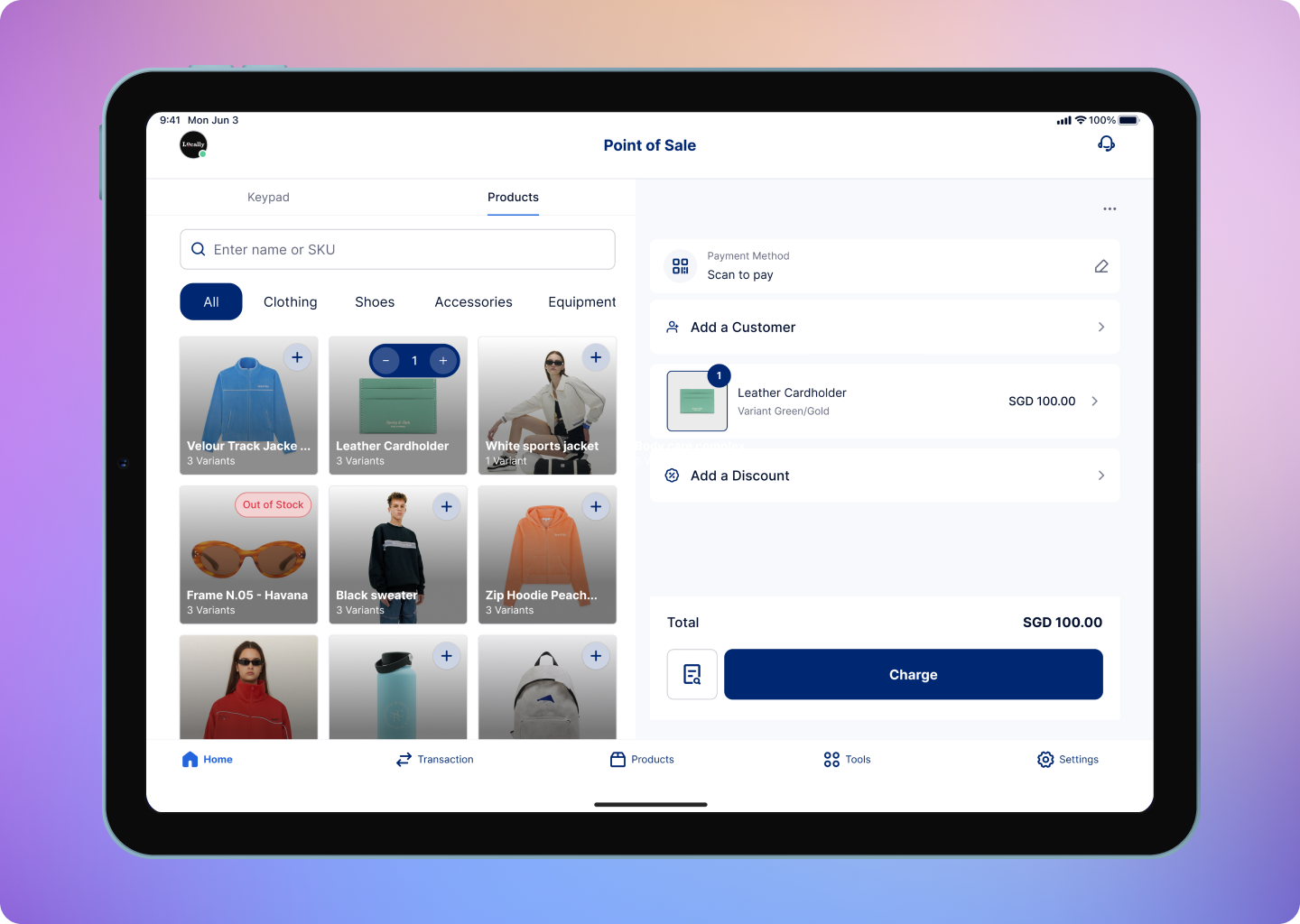 The HitPay POS software is available on three platforms:
* **iOS** (iPhone & iPad)
* **Android**
* **Web Dashboard**
Download the mobile app for iOS and Android devices to get started with HitPay POS.
| Platform | Device Requirements |
| -------- | ----------------------------------------- |
| iOS | iOS 16, iPhone 8 or later |
| iPadOS | iPad models released in 2019 or later |
| MacOS | MacBook or MacBook Air with Apple Silicon |
| Android | Android 9 or above with 3GB or more RAM |
| Category | Details |
| --------------- | ---------------------------------------------------------- |
| App Marketplace | Apple App Store, Google Play Store |
| Countries | SG, MY, PH, ID, TH, AU, NZ, EUROPE, UK, US, CA, HK, KR, JP |
## Card Readers
To accept **card payments**, you'll need to purchase a dedicated card terminal that works with the HitPay POS app. These terminals connect via Bluetooth or Wi-Fi and support major card networks and wallets.
Each supported country has its own process for acquiring a HitPay terminal:
| Country | How to Buy |
| ---------------- | ------------------------------------------------------------ |
| 🇸🇬 Singapore | [Buy from HitPay Shop](https://hitpay.shop/hitpayterminal/) |
| 🇲🇾 Malaysia | [Buy from HitPay Shop](https://hitpay.shop/hitpayterminalmy) |
| 🇵🇭 Philippines | [Buy from HitPay Shop](https://hitpay.shop/hitpayterminalph) |
| 🇭🇰 Hong Kong | [Buy from HitPay Shop](https://hitpay.shop/hitpay-hk) |
| 🇦🇺 Australia | Order via HitPay Dashboard |
| 🇳🇿 New Zealand | Order via HitPay Dashboard |
Click here to learn more about our full range of supported card readers and their specifications.
## What You Can Do with HitPay POS
* Accept a wide range of payment methods: card terminals, QR codes, and tap-to-pay
* Manage orders, products, and inventory
* Print receipts and generate sales reports
* Apply discounts, taxes, surcharges, and tips
* Customize your checkout experience with kiosk mode, customer display, and more
The HitPay POS software is available on three platforms:
* **iOS** (iPhone & iPad)
* **Android**
* **Web Dashboard**
Download the mobile app for iOS and Android devices to get started with HitPay POS.
| Platform | Device Requirements |
| -------- | ----------------------------------------- |
| iOS | iOS 16, iPhone 8 or later |
| iPadOS | iPad models released in 2019 or later |
| MacOS | MacBook or MacBook Air with Apple Silicon |
| Android | Android 9 or above with 3GB or more RAM |
| Category | Details |
| --------------- | ---------------------------------------------------------- |
| App Marketplace | Apple App Store, Google Play Store |
| Countries | SG, MY, PH, ID, TH, AU, NZ, EUROPE, UK, US, CA, HK, KR, JP |
## Card Readers
To accept **card payments**, you'll need to purchase a dedicated card terminal that works with the HitPay POS app. These terminals connect via Bluetooth or Wi-Fi and support major card networks and wallets.
Each supported country has its own process for acquiring a HitPay terminal:
| Country | How to Buy |
| ---------------- | ------------------------------------------------------------ |
| 🇸🇬 Singapore | [Buy from HitPay Shop](https://hitpay.shop/hitpayterminal/) |
| 🇲🇾 Malaysia | [Buy from HitPay Shop](https://hitpay.shop/hitpayterminalmy) |
| 🇵🇭 Philippines | [Buy from HitPay Shop](https://hitpay.shop/hitpayterminalph) |
| 🇭🇰 Hong Kong | [Buy from HitPay Shop](https://hitpay.shop/hitpay-hk) |
| 🇦🇺 Australia | Order via HitPay Dashboard |
| 🇳🇿 New Zealand | Order via HitPay Dashboard |
Click here to learn more about our full range of supported card readers and their specifications.
## What You Can Do with HitPay POS
* Accept a wide range of payment methods: card terminals, QR codes, and tap-to-pay
* Manage orders, products, and inventory
* Print receipts and generate sales reports
* Apply discounts, taxes, surcharges, and tips
* Customize your checkout experience with kiosk mode, customer display, and more