> ## Documentation Index
> Fetch the complete documentation index at: https://docs.hitpayapp.com/llms.txt
> Use this file to discover all available pages before exploring further.
# HitPay Borderless QR
> Accept local QR payments from international customers while receiving payouts in your home currency with automatic currency conversion.
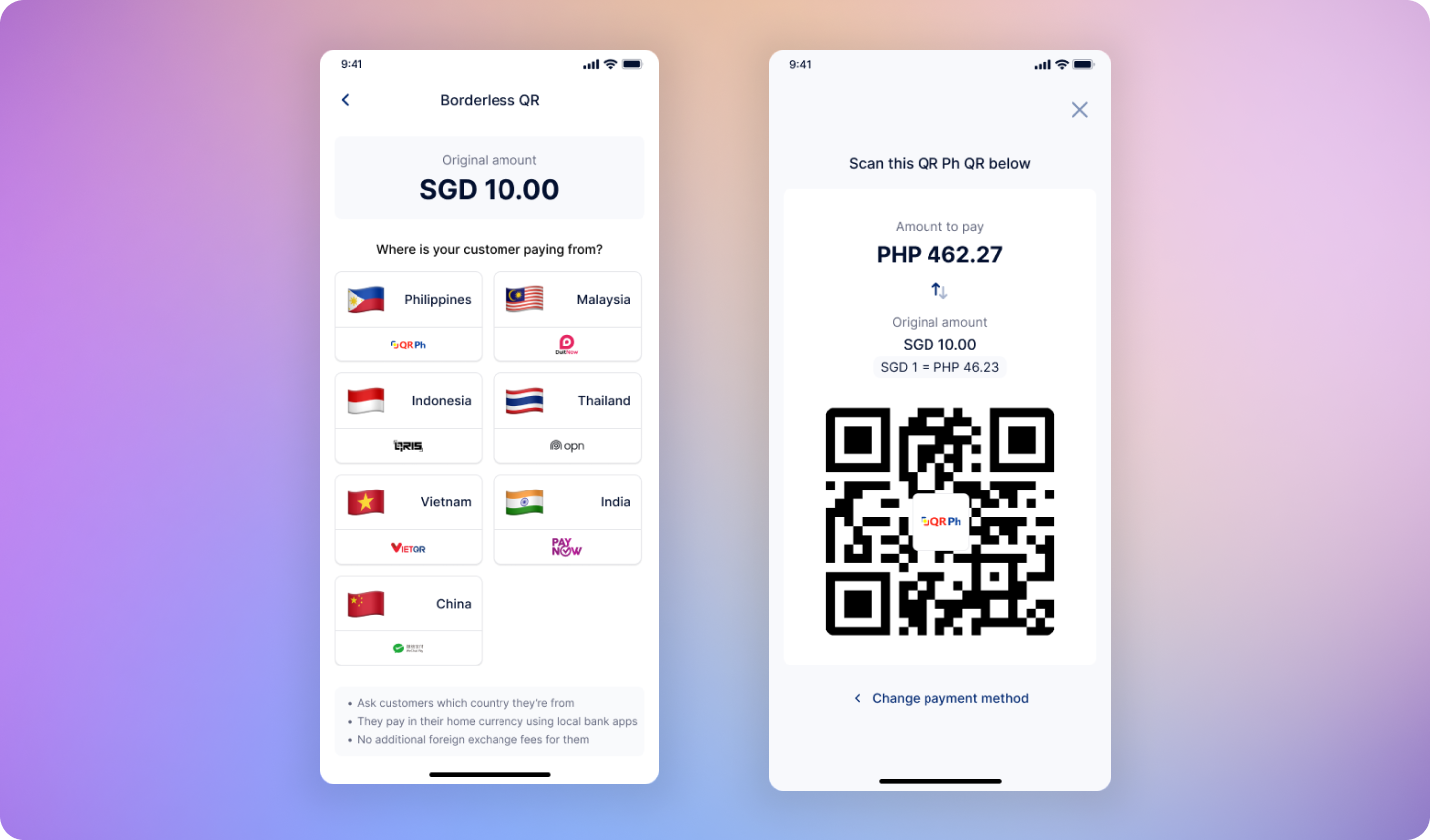 ## Charge in your home currency. Let customers pay in theirs.
HitPay Borderless QR lets physical stores accept local payment methods from international customers, while you always receive payouts in your home currency with automatic currency conversion.
Start accepting cross-border payments today
Learn the simple payment flow
Integrate Borderless QR via API
***
## Cross-Border Payment Challenges
Physical stores often face limitations when serving international customers:
* Most POS systems only support domestic payment methods
* International credit cards incur high processing fees (3% - 3.5%)
* Customers paying with foreign cards face additional FX fees (2% - 4%)
* Manual currency conversion is error-prone and slows down checkout
***
## What HitPay Borderless QR Does
HitPay Borderless QR allows merchants to accept local payment methods from international customers while receiving payouts in their home currency.
**Key capabilities:**
* Accept regional QR payment methods (PayNow, QR Ph, UPI, QRIS, PromptPay, WeChat, VietQR)
* Automatic real-time currency conversion
* Customers pay in their local currency using familiar payment apps
* Merchants receive payouts in their home currency
Designed for physical stores serving international customers—ideal for retail, F\&B, and service businesses that regularly serve tourists and cross-border shoppers. No extra hardware or complex onboarding required.
***
## How It Works
Merchant enters the price in their home currency as usual
Merchant selects the customer's country and preferred payment method
HitPay automatically converts the amount using real-time exchange rates
Customer pays in their local currency. Merchant receives payout in their home currency.
***
## How to Set Up
[Sign up for HitPay](https://www.hitpay.com/signup) if you haven't already.
Complete the account verification process to enable payouts.
Go to Payment Methods in your HitPay dashboard and enable one or more cross-border payment methods (e.g., QR Ph, UPI, QRIS, PromptPay).
Get the app on [iOS](https://apps.apple.com/app/hitpay/id1153486894) or [Android](https://play.google.com/store/apps/details?id=com.hit_pay.hitpay).
Enabled cross-border payment methods will automatically appear in your HitPay POS app.
***
## Example: A Real-World Cross-Border Payment
**Scenario:** A Singapore merchant charges SGD 100 to a Philippine tourist.
1. Merchant enters **SGD 100** in the HitPay POS app
2. Customer selects **QR Ph** as their payment method
3. HitPay displays the amount in **PHP** using real-time exchange rates
4. Customer scans and pays using their Philippine e-wallet
5. Merchant receives payout in **SGD**
**No manual calculations. No currency risk. No confusion.**
***
## Save on Every Transaction
HitPay Borderless QR offers significant savings compared to international card payments for both merchants and customers.
| | HitPay Borderless QR | International Card Payments |
| ---------------------------- | --------------------------- | --------------------------- |
| **Customer FX fees** | 0% | 2% - 4% |
| **Merchant processing fees** | 1.5% payment processing fee | 3% - 3.5% |
**Everyone wins.** Customers avoid hidden FX fees while merchants cut processing costs in half.
***
## Supported Countries & Payment Methods
| Country | Payment Method | Currency | Availability |
| ----------- | -------------------- | --------- | ---------------------------------------------------------------------------------- |
| Singapore | PayNow | SGD | Available to all merchants that enable PayNow cross-border method |
| Malaysia | Touch 'n Go | MYR | Available to all merchants that enable Touch 'n Go cross-border method |
| Philippines | QR Ph, GCash | PHP | Available to all merchants that enable QRPH cross-border method |
| India | UPI | SGD | Available to all merchants that enable UPI cross-border method (UPI International) |
| Indonesia | QRIS | IDR | Available to all merchants that enable QRIS cross-border method |
| Thailand | PromptPay, TrueMoney | THB | Available to all merchants that enable Thailand cross-border method |
| China | WeChat | SGD / MYR | Only available for Singapore & Malaysian merchants (WeChat International) |
| Vietnam | VietQR, ZaloPay | VND | Available to all merchants that enable ZaloPay cross-border method |
***
## Frequently Asked Questions
The exchange rate used for cross-border payments is based on the **mid-market exchange rate** at the time the transaction is processed.
The mid-market exchange rate is the average of the buy and sell rates between two currencies and is commonly used as a benchmark in the foreign exchange market.
Customers are **not charged any additional fees** for cross-border payments.
Unlike card payments, there are no foreign exchange (FX) fees passed on to customers.
Merchants will be charged a 1.5% payment processing fee for any in-person cross-border QR payment method, plus FX fees (if applicable) based on the merchant’s country of registration / settlement currency.
For cross-border payments processed via supported regional payment methods, payouts are credited to your HitPay Balance on a **T+1 calendar day** basis.
No. HitPay Borderless QR works with your existing HitPay POS app. No additional hardware or complex setup required.
Yes. HitPay Borderless QR is an additional payment option that works alongside all your existing local payment methods.
When processing a refund, the customer receives the exact amount they originally paid in their local currency. The exchange rate from the original transaction is used—there is no recalculation based on current rates.
## Charge in your home currency. Let customers pay in theirs.
HitPay Borderless QR lets physical stores accept local payment methods from international customers, while you always receive payouts in your home currency with automatic currency conversion.
Start accepting cross-border payments today
Learn the simple payment flow
Integrate Borderless QR via API
***
## Cross-Border Payment Challenges
Physical stores often face limitations when serving international customers:
* Most POS systems only support domestic payment methods
* International credit cards incur high processing fees (3% - 3.5%)
* Customers paying with foreign cards face additional FX fees (2% - 4%)
* Manual currency conversion is error-prone and slows down checkout
***
## What HitPay Borderless QR Does
HitPay Borderless QR allows merchants to accept local payment methods from international customers while receiving payouts in their home currency.
**Key capabilities:**
* Accept regional QR payment methods (PayNow, QR Ph, UPI, QRIS, PromptPay, WeChat, VietQR)
* Automatic real-time currency conversion
* Customers pay in their local currency using familiar payment apps
* Merchants receive payouts in their home currency
Designed for physical stores serving international customers—ideal for retail, F\&B, and service businesses that regularly serve tourists and cross-border shoppers. No extra hardware or complex onboarding required.
***
## How It Works
Merchant enters the price in their home currency as usual
Merchant selects the customer's country and preferred payment method
HitPay automatically converts the amount using real-time exchange rates
Customer pays in their local currency. Merchant receives payout in their home currency.
***
## How to Set Up
[Sign up for HitPay](https://www.hitpay.com/signup) if you haven't already.
Complete the account verification process to enable payouts.
Go to Payment Methods in your HitPay dashboard and enable one or more cross-border payment methods (e.g., QR Ph, UPI, QRIS, PromptPay).
Get the app on [iOS](https://apps.apple.com/app/hitpay/id1153486894) or [Android](https://play.google.com/store/apps/details?id=com.hit_pay.hitpay).
Enabled cross-border payment methods will automatically appear in your HitPay POS app.
***
## Example: A Real-World Cross-Border Payment
**Scenario:** A Singapore merchant charges SGD 100 to a Philippine tourist.
1. Merchant enters **SGD 100** in the HitPay POS app
2. Customer selects **QR Ph** as their payment method
3. HitPay displays the amount in **PHP** using real-time exchange rates
4. Customer scans and pays using their Philippine e-wallet
5. Merchant receives payout in **SGD**
**No manual calculations. No currency risk. No confusion.**
***
## Save on Every Transaction
HitPay Borderless QR offers significant savings compared to international card payments for both merchants and customers.
| | HitPay Borderless QR | International Card Payments |
| ---------------------------- | --------------------------- | --------------------------- |
| **Customer FX fees** | 0% | 2% - 4% |
| **Merchant processing fees** | 1.5% payment processing fee | 3% - 3.5% |
**Everyone wins.** Customers avoid hidden FX fees while merchants cut processing costs in half.
***
## Supported Countries & Payment Methods
| Country | Payment Method | Currency | Availability |
| ----------- | -------------------- | --------- | ---------------------------------------------------------------------------------- |
| Singapore | PayNow | SGD | Available to all merchants that enable PayNow cross-border method |
| Malaysia | Touch 'n Go | MYR | Available to all merchants that enable Touch 'n Go cross-border method |
| Philippines | QR Ph, GCash | PHP | Available to all merchants that enable QRPH cross-border method |
| India | UPI | SGD | Available to all merchants that enable UPI cross-border method (UPI International) |
| Indonesia | QRIS | IDR | Available to all merchants that enable QRIS cross-border method |
| Thailand | PromptPay, TrueMoney | THB | Available to all merchants that enable Thailand cross-border method |
| China | WeChat | SGD / MYR | Only available for Singapore & Malaysian merchants (WeChat International) |
| Vietnam | VietQR, ZaloPay | VND | Available to all merchants that enable ZaloPay cross-border method |
***
## Frequently Asked Questions
The exchange rate used for cross-border payments is based on the **mid-market exchange rate** at the time the transaction is processed.
The mid-market exchange rate is the average of the buy and sell rates between two currencies and is commonly used as a benchmark in the foreign exchange market.
Customers are **not charged any additional fees** for cross-border payments.
Unlike card payments, there are no foreign exchange (FX) fees passed on to customers.
Merchants will be charged a 1.5% payment processing fee for any in-person cross-border QR payment method, plus FX fees (if applicable) based on the merchant’s country of registration / settlement currency.
For cross-border payments processed via supported regional payment methods, payouts are credited to your HitPay Balance on a **T+1 calendar day** basis.
No. HitPay Borderless QR works with your existing HitPay POS app. No additional hardware or complex setup required.
Yes. HitPay Borderless QR is an additional payment option that works alongside all your existing local payment methods.
When processing a refund, the customer receives the exact amount they originally paid in their local currency. The exchange rate from the original transaction is used—there is no recalculation based on current rates.