> ## Documentation Index
> Fetch the complete documentation index at: https://docs.hitpayapp.com/llms.txt
> Use this file to discover all available pages before exploring further.
# Magento
> Integrate HitPay payment gateway into your Magento store
## Account Setup
HitPay allows Magento 1 and 2 Store owners to accept local and international payments on their e-commerce website, providing seamless payment experience for your customers and an easy integration process for the developers. HitPay payment works by creating Payment Request and then the customers accepting the Payment Request.
Before you begin integrating HitPay payments into your Magento online store, you need to set up your HitPay account and ensure some prerequisites are met:
1. If you haven't already, create an account on [HitPay](/setup/account_creation).
2. Ensure that you have the necessary payment methods [activated](payments/online_payments#how-to-activate-payment-methods) in your HitPay account.
3. Make sure the payment methods you want to offer are [enabled](/payments/online_payments#how-to-enable-payment-methods) in your Magento sales channel.
## Integration Guide
Follow these steps to seamlessly integrate HitPay payments into your Magento store:
### Installation
Visit [https://github.com/hit-pay/magento1-extension/releases](https://github.com/hit-pay/magento1-extension/releases) to install the Magento 1 HitPay plugin
Visit [https://github.com/hit-pay/magento2-extension/releases](https://github.com/hit-pay/magento2-extension/releases) to install the Magento 2 HitPay plugin
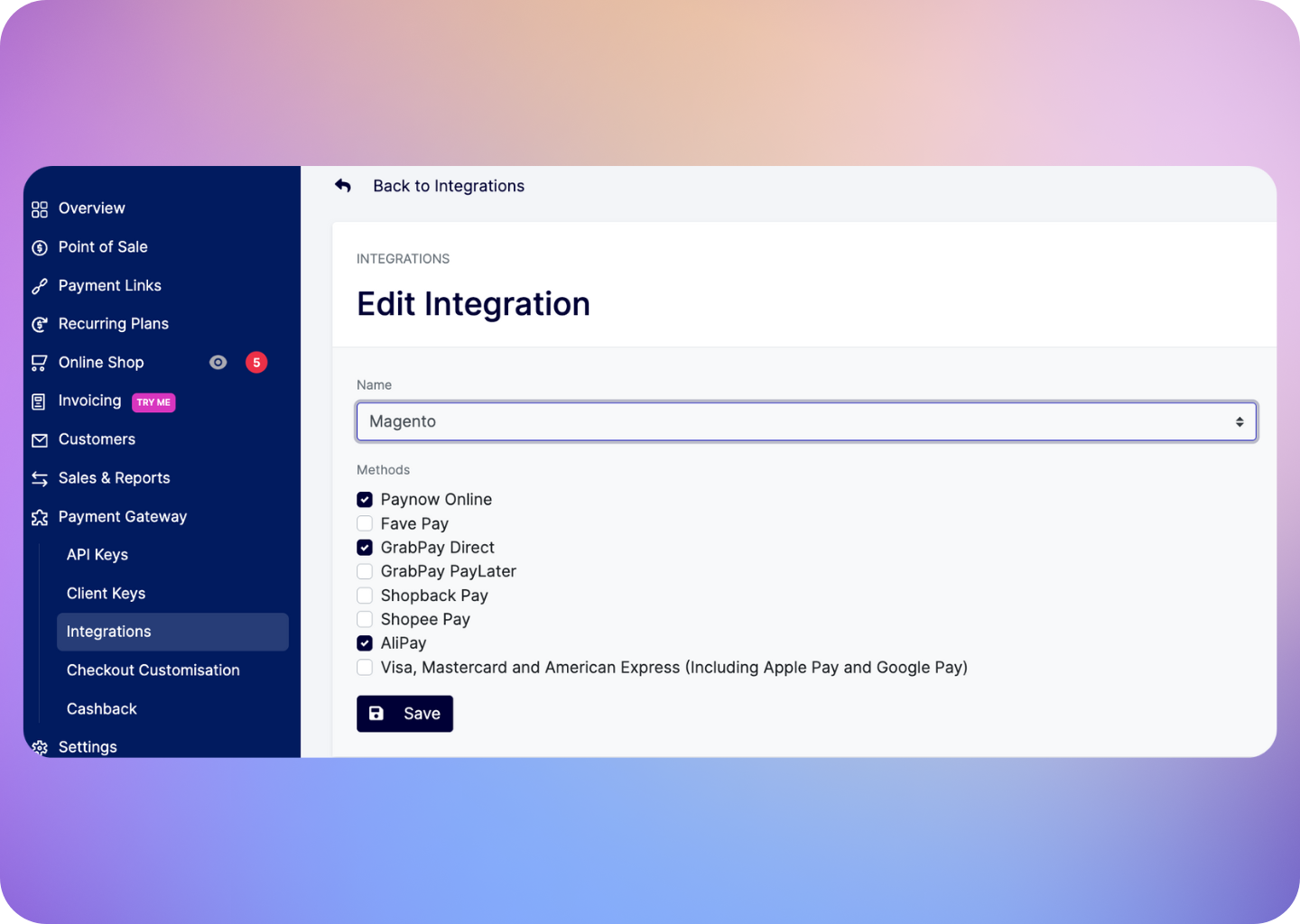
After following the installation guide on Github, ensure that you complete your [Integration Settings](https://hitpay.mintlify.app/payments/online_payments#how-to-enable-payment-methods) for Magento to complete the integration to your website:
 That’s it! You’re all set up with HitPay on Magento. 🎉
## FAQs
No, HitPay does not send an email confirmation to your customer if the payment is made through Magento. This is because Magento, by default, sends an email to your customer with the order details. To prevent duplicate emails, HitPay does not send an additional email to your customers. As a merchant, you will receive a payment alert email.
If you are unable to resolve the Magento issues, you can request HitPay support to help with your debugging. But before that, make sure the following checks are completed:
* Ensure that your credentials are correct, both the API Key and Salt.
* Ensure that you are testing with an amount greater than \$1 (or equivalent).
* Make sure the webhook in the HitPay dashboard shows "Success."
Please provide the following details to the HitPay team:
1. Debug logs from your Magento store.
2. Admin access to your Magento test store (Since our team will be debugging, please avoid sending access to your live store).
3. SFTP access to your test store.
You can send the details to [support@hit-pay.com](mailto:support@hit-pay.com) (Approximate debug time would be 3 to 5 business days).
That’s it! You’re all set up with HitPay on Magento. 🎉
## FAQs
No, HitPay does not send an email confirmation to your customer if the payment is made through Magento. This is because Magento, by default, sends an email to your customer with the order details. To prevent duplicate emails, HitPay does not send an additional email to your customers. As a merchant, you will receive a payment alert email.
If you are unable to resolve the Magento issues, you can request HitPay support to help with your debugging. But before that, make sure the following checks are completed:
* Ensure that your credentials are correct, both the API Key and Salt.
* Ensure that you are testing with an amount greater than \$1 (or equivalent).
* Make sure the webhook in the HitPay dashboard shows "Success."
Please provide the following details to the HitPay team:
1. Debug logs from your Magento store.
2. Admin access to your Magento test store (Since our team will be debugging, please avoid sending access to your live store).
3. SFTP access to your test store.
You can send the details to [support@hit-pay.com](mailto:support@hit-pay.com) (Approximate debug time would be 3 to 5 business days).