> ## Documentation Index
> Fetch the complete documentation index at: https://docs.hitpayapp.com/llms.txt
> Use this file to discover all available pages before exploring further.
# Adaptive Pricing
> Accept payments in your home currency while international customers pay in theirs — no conversions, no surprises.
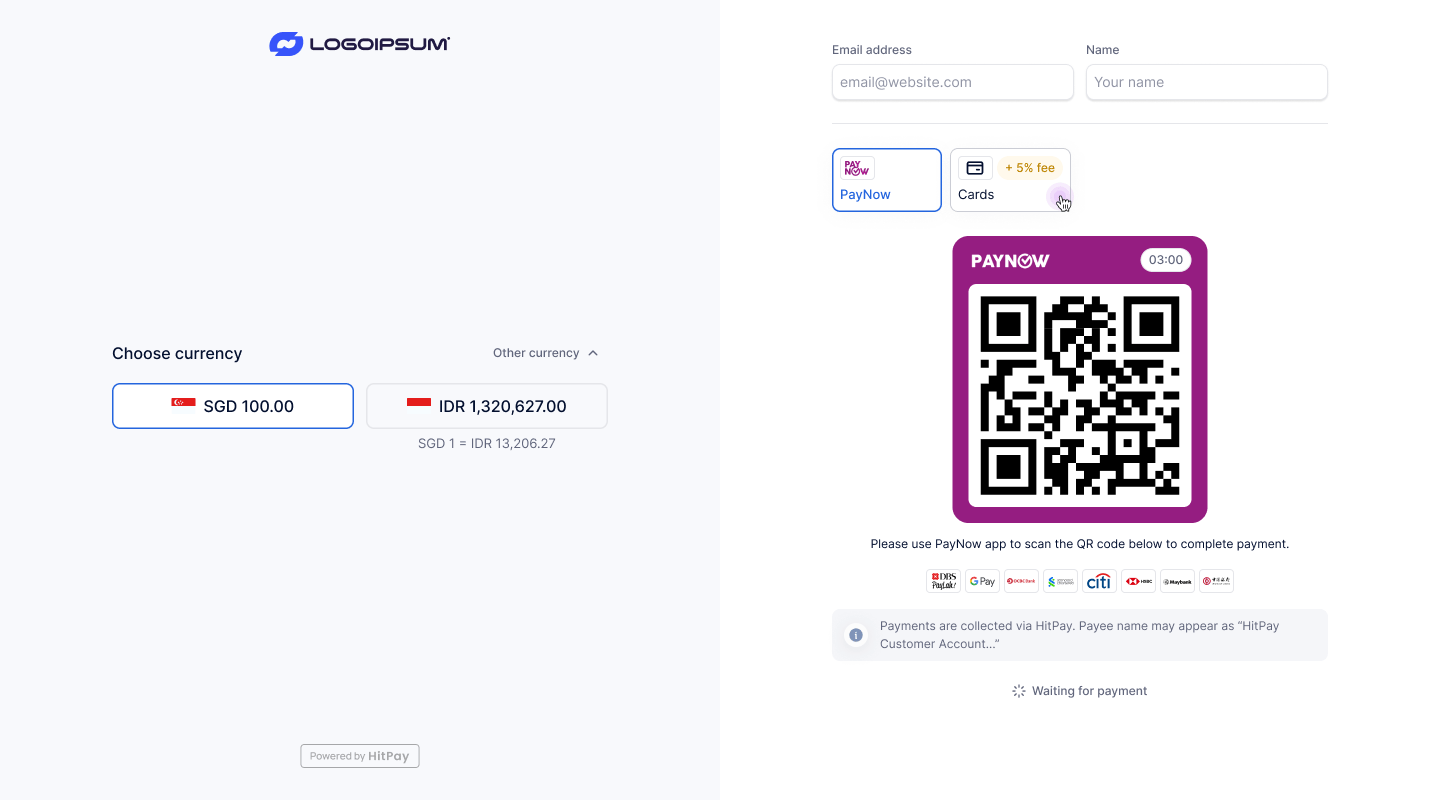 ## Charge in your home currency. Let customers pay in theirs.
HitPay Adaptive Pricing lets online merchants serve international customers without creating separate payment links per currency. When a customer from overseas lands on your hosted checkout, HitPay detects their location and automatically shows the amount in their local currency with local payment methods — while you still receive your home currency payout.
Start accepting cross-border payments online
Learn the simple checkout flow
Integrate adaptive pricing via the Payment Request API
***
## How It Works
You create a payment link or hosted checkout as normal, priced in your home currency (e.g. SGD 120).
HitPay detects the customer's location via IP address and determines their likely local currency (e.g. IDR, MYR, THB, PHP).
If the detected currency differs from the merchant's default currency, the checkout displays a currency selector. The customer sees the converted amount in their local currency alongside relevant local payment methods. The FX rate is locked at page load and refreshes on reload.
The customer pays in their local currency using their preferred local payment method. HitPay handles the FX conversion automatically and credits the merchant's payout in their home currency.
***
## How to Set Up
[Sign up for HitPay](https://www.hitpay.com/signup) if you haven't already, and complete account verification.
Navigate to **Settings > Payment Methods** and connect the cross-border payment methods you want to support (e.g. QRIS, DuitNow, PromptPay, QR Ph, VietQR).
Partner providers review new requests within 3–5 business days.
Go to **Settings > Checkout Customisation > Adaptive Pricing** and turn on the **Enable Adaptive Pricing** toggle. Save your settings.
Once enabled, all hosted checkout sessions for your account will automatically activate adaptive pricing for international customers.
***
## Example
**Scenario:** A Singapore merchant charges SGD 120 to a customer visiting from Indonesia.
1. Merchant creates a payment request for **SGD 120**
2. Indonesian customer opens the checkout link
3. HitPay detects an Indonesian IP and displays the equivalent in **IDR** with QRIS as a payment option
4. Customer selects IDR, sees the converted amount, and pays via QRIS
5. Merchant receives payout in **SGD**
***
## Fees
| | Adaptive Pricing |
| --------------------------- | ------------------------------------------------------- |
| **Customer FX fees** | 0% — no additional fees charged to the customer |
| **Merchant processing fee** | Standard payment processing fee applies |
| **FX markup** | A 1% FX markup is applied on top of the mid-market rate |
The FX rate displayed at checkout is based on the mid-market rate at page load, plus a 1% markup. The rate is locked at checkout load and refreshes when the page is reloaded.
***
## Supported Payment Methods
Adaptive Pricing is available with HitPay's cross-border payment methods. See the full list on the [Cross-Border Payments](/payments/cross-border-payments#supported-payment-methods) page.
***
## Frequently Asked Questions
Only customers whose detected country maps to a currency that differs from the merchant's default currency. Domestic customers (same currency as the merchant) see the standard checkout with no currency selector.
The rate is based on the **mid-market exchange rate** at the time the checkout page loads, with a **1% FX markup** applied. The rate is locked for the duration of that checkout session and refreshes when the customer reloads the page.
If the detected currency is not supported or matches the merchant's default currency, the checkout falls back to showing only the merchant's default currency and payment methods — no currency selector is shown.
Yes. Payment requests created via the API also support adaptive pricing on the hosted checkout, as long as Adaptive Pricing is enabled in your Checkout Customisation settings.
No. Adaptive Pricing is currently available for one-time hosted checkout payments only. Recurring billing and subscription charges are out of scope for this feature.
Cross-border payments processed via Adaptive Pricing are credited to your HitPay Balance on a **T+1 calendar day** basis.
***
## Restrictions
Adaptive Pricing is **not available** for the following:
* **Default payment link** — The default payment link on your account does not support Adaptive Pricing.
* **Open amount payment links** — Payment links without a fixed amount set are not eligible for currency conversion.
***
## Testing
To test local currency presentment, pass a location-formatted email address that includes a `+location_XX` suffix — where `XX` is a valid two-letter ISO country code — as the customer email when creating a payment request.
For example, to simulate a customer in France, use an email like `test+location_FR@example.com`. When the checkout is opened, HitPay will present the currency as a customer in that country would see it.
You can do this in two ways:
* **API** — Set the `email` field to a location-formatted address when creating a payment request via the [Payment Request API](/apis/guide/cross-border-payments).
* **Dashboard** — When sending a payment link by email, enter a location-formatted address (e.g. `test+location_ID@example.com`) in the email field.
***
## For Developers
Integrate adaptive pricing into your custom checkout via the Payment Request API. The `localised_pricing` parameter enables currency selection on the hosted checkout page.
## Charge in your home currency. Let customers pay in theirs.
HitPay Adaptive Pricing lets online merchants serve international customers without creating separate payment links per currency. When a customer from overseas lands on your hosted checkout, HitPay detects their location and automatically shows the amount in their local currency with local payment methods — while you still receive your home currency payout.
Start accepting cross-border payments online
Learn the simple checkout flow
Integrate adaptive pricing via the Payment Request API
***
## How It Works
You create a payment link or hosted checkout as normal, priced in your home currency (e.g. SGD 120).
HitPay detects the customer's location via IP address and determines their likely local currency (e.g. IDR, MYR, THB, PHP).
If the detected currency differs from the merchant's default currency, the checkout displays a currency selector. The customer sees the converted amount in their local currency alongside relevant local payment methods. The FX rate is locked at page load and refreshes on reload.
The customer pays in their local currency using their preferred local payment method. HitPay handles the FX conversion automatically and credits the merchant's payout in their home currency.
***
## How to Set Up
[Sign up for HitPay](https://www.hitpay.com/signup) if you haven't already, and complete account verification.
Navigate to **Settings > Payment Methods** and connect the cross-border payment methods you want to support (e.g. QRIS, DuitNow, PromptPay, QR Ph, VietQR).
Partner providers review new requests within 3–5 business days.
Go to **Settings > Checkout Customisation > Adaptive Pricing** and turn on the **Enable Adaptive Pricing** toggle. Save your settings.
Once enabled, all hosted checkout sessions for your account will automatically activate adaptive pricing for international customers.
***
## Example
**Scenario:** A Singapore merchant charges SGD 120 to a customer visiting from Indonesia.
1. Merchant creates a payment request for **SGD 120**
2. Indonesian customer opens the checkout link
3. HitPay detects an Indonesian IP and displays the equivalent in **IDR** with QRIS as a payment option
4. Customer selects IDR, sees the converted amount, and pays via QRIS
5. Merchant receives payout in **SGD**
***
## Fees
| | Adaptive Pricing |
| --------------------------- | ------------------------------------------------------- |
| **Customer FX fees** | 0% — no additional fees charged to the customer |
| **Merchant processing fee** | Standard payment processing fee applies |
| **FX markup** | A 1% FX markup is applied on top of the mid-market rate |
The FX rate displayed at checkout is based on the mid-market rate at page load, plus a 1% markup. The rate is locked at checkout load and refreshes when the page is reloaded.
***
## Supported Payment Methods
Adaptive Pricing is available with HitPay's cross-border payment methods. See the full list on the [Cross-Border Payments](/payments/cross-border-payments#supported-payment-methods) page.
***
## Frequently Asked Questions
Only customers whose detected country maps to a currency that differs from the merchant's default currency. Domestic customers (same currency as the merchant) see the standard checkout with no currency selector.
The rate is based on the **mid-market exchange rate** at the time the checkout page loads, with a **1% FX markup** applied. The rate is locked for the duration of that checkout session and refreshes when the customer reloads the page.
If the detected currency is not supported or matches the merchant's default currency, the checkout falls back to showing only the merchant's default currency and payment methods — no currency selector is shown.
Yes. Payment requests created via the API also support adaptive pricing on the hosted checkout, as long as Adaptive Pricing is enabled in your Checkout Customisation settings.
No. Adaptive Pricing is currently available for one-time hosted checkout payments only. Recurring billing and subscription charges are out of scope for this feature.
Cross-border payments processed via Adaptive Pricing are credited to your HitPay Balance on a **T+1 calendar day** basis.
***
## Restrictions
Adaptive Pricing is **not available** for the following:
* **Default payment link** — The default payment link on your account does not support Adaptive Pricing.
* **Open amount payment links** — Payment links without a fixed amount set are not eligible for currency conversion.
***
## Testing
To test local currency presentment, pass a location-formatted email address that includes a `+location_XX` suffix — where `XX` is a valid two-letter ISO country code — as the customer email when creating a payment request.
For example, to simulate a customer in France, use an email like `test+location_FR@example.com`. When the checkout is opened, HitPay will present the currency as a customer in that country would see it.
You can do this in two ways:
* **API** — Set the `email` field to a location-formatted address when creating a payment request via the [Payment Request API](/apis/guide/cross-border-payments).
* **Dashboard** — When sending a payment link by email, enter a location-formatted address (e.g. `test+location_ID@example.com`) in the email field.
***
## For Developers
Integrate adaptive pricing into your custom checkout via the Payment Request API. The `localised_pricing` parameter enables currency selection on the hosted checkout page.