> ## Documentation Index
> Fetch the complete documentation index at: https://docs.hitpayapp.com/llms.txt
> Use this file to discover all available pages before exploring further.
# Refer and Earn
> Share your referral link, invite businesses to HitPay, and earn recurring commissions on every payment they process.
## Overview
Every HitPay account comes with **Refer and Earn** built in. Share your unique referral link, invite businesses to join HitPay, and earn a recurring commission on every online payment they process — no separate partner application required.
## What you earn
Get **0.1% recurring commission** on every payment your referred merchants process. As they grow, this can scale into **\$1,000 to \$10,000 in monthly passive revenue**.
Join **500+ partners** who've referred **10,000+ businesses** and earned over **\$1M in commissions**.
Commission is earned on your referred merchants' online payments and excludes POS / Terminal and Recurring plan transactions.
## How to get your unique link
Open the **Refer** tab from the bottom of the left-hand navigation in your HitPay dashboard. Here you'll find your unique referral link along with a running count of the businesses you've referred.
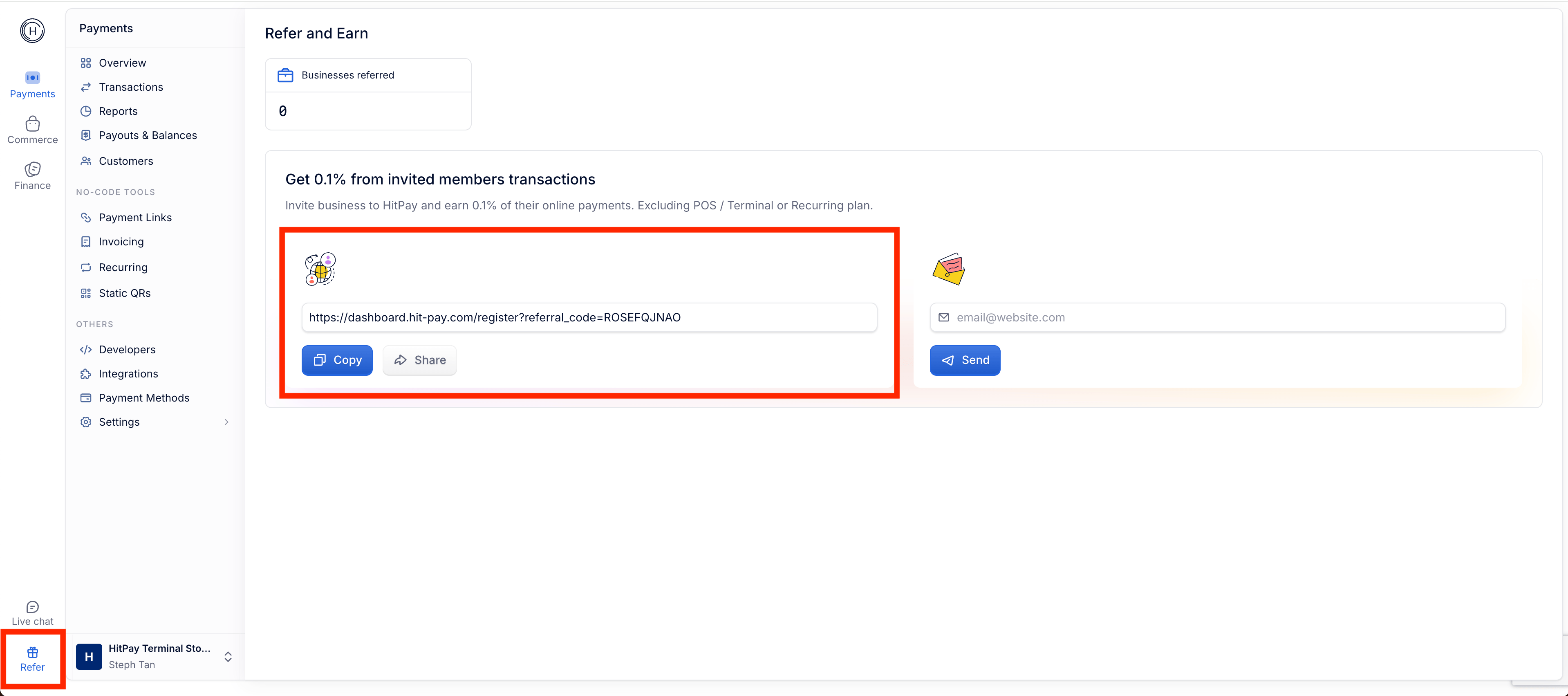 You have two ways to invite a business:
* **Copy or Share your link** — Use **Copy** to grab your referral link, or **Share** to send it directly through your preferred channel (email, social media, messaging apps).
* **Send an invite by email** — Enter the merchant's email address in the invite box and click **Send** to email them your referral automatically.
The business must sign up using your referral link (or emailed invite) for the referral to be correctly attributed to your account. Manual linking is not supported.
## Tracking your referrals
The **Businesses referred** counter at the top of the Refer page shows how many merchants have signed up through your link. As your referred businesses process payments, your commissions accrue automatically.
## Getting paid
Commissions are calculated on your referred merchants' eligible online transactions and paid out to your linked account. Payments are processed on the 1st day of each month for the previous month's transactions.
## FAQs
You earn 0.1% recurring commission on every eligible online payment your referred merchants process, for as long as they remain active on HitPay.
Commission applies to online payments. POS / Terminal and Recurring plan transactions are excluded.
Payments are processed on the 1st day of each month for the previous month's transactions from your referred merchants.
We do not support manual linking of merchants. If a merchant did not sign up using your referral link or emailed invite, they will not be attributed to your account. For assistance, contact our support team.
For any additional questions, our support team ([support@hit-pay.com](mailto:support@hit-pay.com)) is always available to help.
You have two ways to invite a business:
* **Copy or Share your link** — Use **Copy** to grab your referral link, or **Share** to send it directly through your preferred channel (email, social media, messaging apps).
* **Send an invite by email** — Enter the merchant's email address in the invite box and click **Send** to email them your referral automatically.
The business must sign up using your referral link (or emailed invite) for the referral to be correctly attributed to your account. Manual linking is not supported.
## Tracking your referrals
The **Businesses referred** counter at the top of the Refer page shows how many merchants have signed up through your link. As your referred businesses process payments, your commissions accrue automatically.
## Getting paid
Commissions are calculated on your referred merchants' eligible online transactions and paid out to your linked account. Payments are processed on the 1st day of each month for the previous month's transactions.
## FAQs
You earn 0.1% recurring commission on every eligible online payment your referred merchants process, for as long as they remain active on HitPay.
Commission applies to online payments. POS / Terminal and Recurring plan transactions are excluded.
Payments are processed on the 1st day of each month for the previous month's transactions from your referred merchants.
We do not support manual linking of merchants. If a merchant did not sign up using your referral link or emailed invite, they will not be attributed to your account. For assistance, contact our support team.
For any additional questions, our support team ([support@hit-pay.com](mailto:support@hit-pay.com)) is always available to help.