> ## Documentation Index
> Fetch the complete documentation index at: https://docs.hitpayapp.com/llms.txt
> Use this file to discover all available pages before exploring further.
# Data Flow
> Understanding how data flows between your system and HitPay during payment processing
## Overview
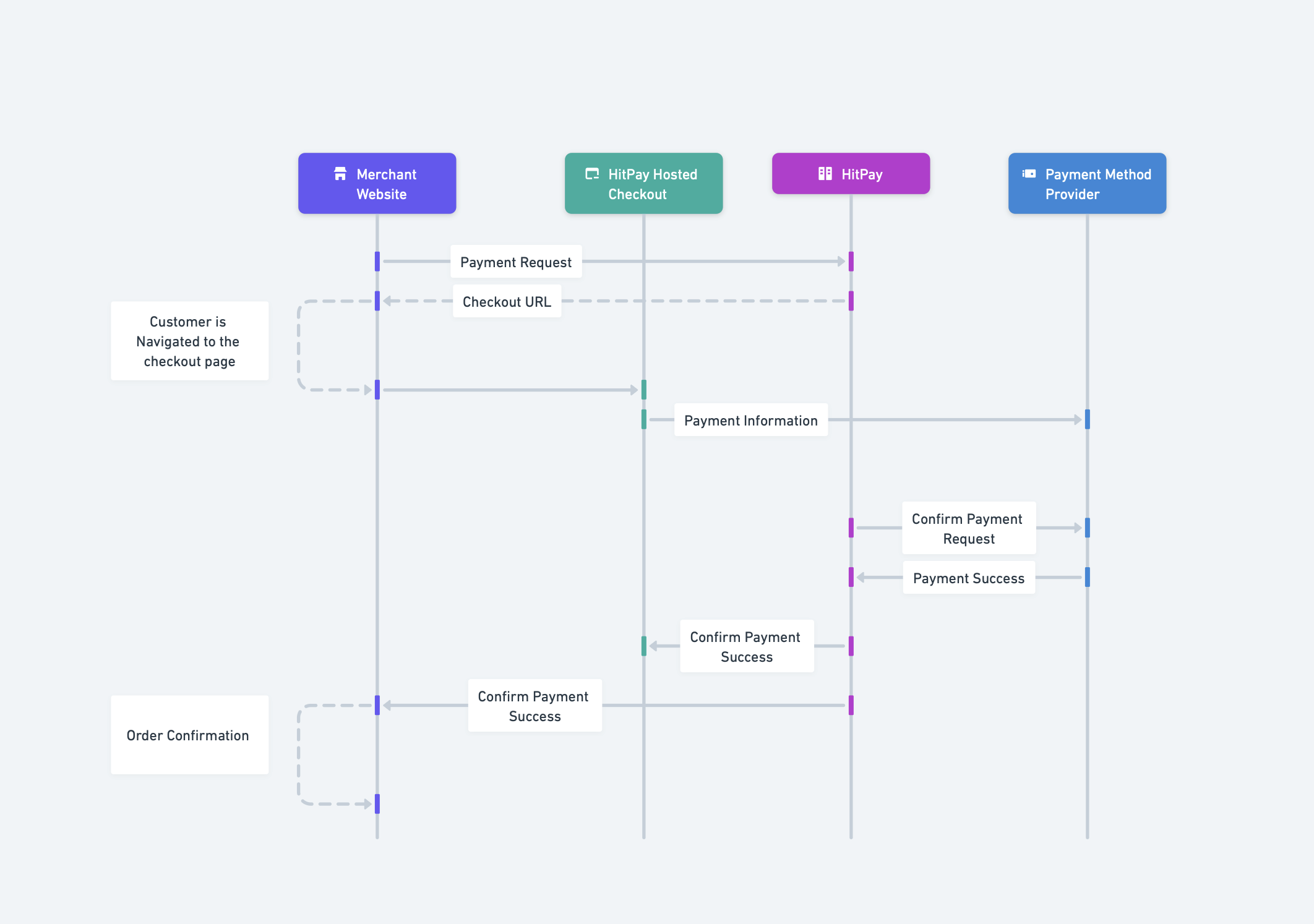
This document explains how data flows between your system (Merchant Website), HitPay's services, and payment method providers during a typical payment transaction. All communications use **HTTPS (TLS 1.3)** to ensure data is encrypted in transit.
 ## Communication Protocol
All API communications between your system and HitPay are secured using:
* **HTTPS (TLS 1.3)**: All data transmitted between systems is encrypted
* **AES Encryption**: Sensitive data at rest is encrypted using AES
* **HMAC-SHA256**: Webhook signatures ensure data integrity and authenticity
HitPay is PCI-DSS compliant. Sensitive payment information (card numbers, CVV) never touches your servers when using the hosted checkout or Drop-In UI.
## Participants
The payment flow involves four main participants:
| Participant | Role |
| --------------------------- | ------------------------------------------------------------- |
| **Merchant Website** | Your e-commerce platform or application |
| **HitPay Hosted Checkout** | Secure payment page hosted by HitPay |
| **HitPay** | Payment orchestration and processing |
| **Payment Method Provider** | Banks, card networks, e-wallets (PayNow, Visa, GrabPay, etc.) |
## Data Flow Explained
### Payment Request
Your server sends a payment request to HitPay via HTTPS. HitPay validates the request, creates a payment record, and returns a secure checkout URL where your customer will complete the payment.
### Customer Checkout
The customer is redirected to HitPay's secure hosted checkout page where they select a payment method and enter their payment details.
### Payment Processing
HitPay securely transmits the payment information to the relevant payment method provider (banks, card networks, or e-wallets). The provider processes the transaction and returns an authorization response to HitPay.
### Payment Confirmation
Once the payment is confirmed, HitPay notifies your system via a webhook (server-to-server POST request) and redirects the customer back to your website. The webhook contains the payment status and transaction details, signed with HMAC-SHA256 for authenticity verification.
## Data Flow Summary
| Step | Direction | Protocol | Data Type |
| ---- | -------------------------- | -------------------- | ------------------------------- |
| 1 | Merchant → HitPay | HTTPS POST | Order details, customer info |
| 2 | Customer → HitPay Checkout | HTTPS (Browser) | Payment method selection |
| 3 | HitPay Checkout → HitPay | HTTPS | Payment credentials (encrypted) |
| 4 | HitPay → Payment Provider | Secure API | Transaction data (tokenized) |
| 5 | Payment Provider → HitPay | Secure API | Authorization response |
| 6 | HitPay → Merchant | HTTPS POST (Webhook) | Payment confirmation |
| 7 | Merchant → Customer | HTTPS | Order confirmation |
## Security Considerations
HitPay stores transaction records including:
* Payment request details (amount, currency, reference numbers)
* Customer contact information (email, phone) if provided
* Payment status and timestamps
* Tokenized payment method references (not raw card numbers)
Sensitive card data is handled by PCI-DSS compliant payment processors and is not stored in plain text.
The following data stays on your system:
* Customer passwords or authentication credentials
* Full customer profiles or purchase history
* Product inventory or catalog details
* Internal business logic or pricing rules
You only send the minimum data required to process the payment.
* API keys should only be stored on your server, never in client-side code
* All API requests use HTTPS to encrypt the API key in transit
* Rotate API keys periodically from your dashboard
* Use separate API keys for sandbox and production environments
Every webhook includes an `Hitpay-Signature` header containing an HMAC-SHA256 hash. Compute the hash of the payload using your salt value and compare:
```
Signature = HMAC-SHA256(payload, your_salt)
```
If the signatures match, the webhook is authentic and has not been tampered with.
## Related Documentation
Learn about HitPay's security practices and compliance certifications
Step-by-step integration guide for online payments
## Communication Protocol
All API communications between your system and HitPay are secured using:
* **HTTPS (TLS 1.3)**: All data transmitted between systems is encrypted
* **AES Encryption**: Sensitive data at rest is encrypted using AES
* **HMAC-SHA256**: Webhook signatures ensure data integrity and authenticity
HitPay is PCI-DSS compliant. Sensitive payment information (card numbers, CVV) never touches your servers when using the hosted checkout or Drop-In UI.
## Participants
The payment flow involves four main participants:
| Participant | Role |
| --------------------------- | ------------------------------------------------------------- |
| **Merchant Website** | Your e-commerce platform or application |
| **HitPay Hosted Checkout** | Secure payment page hosted by HitPay |
| **HitPay** | Payment orchestration and processing |
| **Payment Method Provider** | Banks, card networks, e-wallets (PayNow, Visa, GrabPay, etc.) |
## Data Flow Explained
### Payment Request
Your server sends a payment request to HitPay via HTTPS. HitPay validates the request, creates a payment record, and returns a secure checkout URL where your customer will complete the payment.
### Customer Checkout
The customer is redirected to HitPay's secure hosted checkout page where they select a payment method and enter their payment details.
### Payment Processing
HitPay securely transmits the payment information to the relevant payment method provider (banks, card networks, or e-wallets). The provider processes the transaction and returns an authorization response to HitPay.
### Payment Confirmation
Once the payment is confirmed, HitPay notifies your system via a webhook (server-to-server POST request) and redirects the customer back to your website. The webhook contains the payment status and transaction details, signed with HMAC-SHA256 for authenticity verification.
## Data Flow Summary
| Step | Direction | Protocol | Data Type |
| ---- | -------------------------- | -------------------- | ------------------------------- |
| 1 | Merchant → HitPay | HTTPS POST | Order details, customer info |
| 2 | Customer → HitPay Checkout | HTTPS (Browser) | Payment method selection |
| 3 | HitPay Checkout → HitPay | HTTPS | Payment credentials (encrypted) |
| 4 | HitPay → Payment Provider | Secure API | Transaction data (tokenized) |
| 5 | Payment Provider → HitPay | Secure API | Authorization response |
| 6 | HitPay → Merchant | HTTPS POST (Webhook) | Payment confirmation |
| 7 | Merchant → Customer | HTTPS | Order confirmation |
## Security Considerations
HitPay stores transaction records including:
* Payment request details (amount, currency, reference numbers)
* Customer contact information (email, phone) if provided
* Payment status and timestamps
* Tokenized payment method references (not raw card numbers)
Sensitive card data is handled by PCI-DSS compliant payment processors and is not stored in plain text.
The following data stays on your system:
* Customer passwords or authentication credentials
* Full customer profiles or purchase history
* Product inventory or catalog details
* Internal business logic or pricing rules
You only send the minimum data required to process the payment.
* API keys should only be stored on your server, never in client-side code
* All API requests use HTTPS to encrypt the API key in transit
* Rotate API keys periodically from your dashboard
* Use separate API keys for sandbox and production environments
Every webhook includes an `Hitpay-Signature` header containing an HMAC-SHA256 hash. Compute the hash of the payload using your salt value and compare:
```
Signature = HMAC-SHA256(payload, your_salt)
```
If the signatures match, the webhook is authentic and has not been tampered with.
## Related Documentation
Learn about HitPay's security practices and compliance certifications
Step-by-step integration guide for online payments