> ## Documentation Index
> Fetch the complete documentation index at: https://docs.hitpayapp.com/llms.txt
> Use this file to discover all available pages before exploring further.
# Save Payment Method
> API to save a payment method including cards and APMs securely for future billing
## Overview
The Save Payment Method API allows you to securely store a customer's payment credentials and charge them later—on your schedule, for any amount. Unlike fixed recurring billing, this approach gives you full control over when and how much to charge.
**Key Concept:** You're creating a "billing session" where the customer authorizes you to save their payment method. Once saved, you can charge it anytime via API without the customer needing to re-enter their details.
## Supported Payment Methods
| Payment Method | Supported Countries | Supported Currencies | Method Code |
| :----------------------------- | :------------------------------- | :------------------- | :--------------- |
| Cards (Visa, Mastercard, Amex) | Singapore, Malaysia | All | `card` |
| ShopeePay | Singapore, Malaysia, Philippines | SGD, MYR, PHP | `shopee_pay` |
| GrabPay | Singapore, Malaysia | SGD, MYR | `grabpay_direct` |
| Touch 'n Go | Malaysia | MYR | `touch_n_go` |
| LINE Pay | All (Cross-Border) | THB | `line_pay` |
When creating the billing session, you can offer multiple payment methods (e.g., cards + ShopeePay + GrabPay) and let the customer choose their preferred option.
**Want to keep customers on your site?** When using APMs (ShopeePay, GrabPay, Touch ‘n Go, LINE Pay, or GIRO), you can handle the payment flow directly in your UI using the deep link or setup instructions returned in the API response, no redirect to a HitPay-hosted page. This is not supported for cards. See [Embedded Recurring APMs](/apis/guide/embedded-recurring-billing).
## When to Use This
This API is ideal when you need flexibility in your billing:
Charge different amounts each time based on usage, consumption, or services rendered.
Bill customers when needed rather than on a fixed schedule (e.g., marketplace payouts, top-ups).
Run subscriptions where the amount may change (upgrades, add-ons, prorated charges).
Save the payment method now but only charge when the customer's trial ends or service begins.
## How It Works
The integration follows 3 steps:
Call the `/v1/recurring-billing` API with `save_payment_method=true`. You'll receive a checkout URL to redirect the customer.
Redirect the customer to the checkout URL where they select their preferred payment method (card, ShopeePay, GrabPay, etc.) and authorize it.
Once attached, use the charge API to bill the customer any amount, anytime. No customer interaction required.
## Step 1 – Create a Billing Session
Create a billing session by calling the `/v1/recurring-billing` API with `save_payment_method=true`. This returns a checkout URL where your customer can attach their payment method.
### Endpoint
```
POST https://api.sandbox.hit-pay.com/v1/recurring-billing
```
### Request Parameters
**Required fields:** `name`, `customer_email`, `amount`, and `save_payment_method=true`
| Parameter | Description | Example |
| :-------------------- | :-------------------------------------------------------------- | :--------------------------------------------------------- |
| name | Name for this billing session | Spotify Premium |
| customer\_email | Customer's email address | [paul@hitpayapp.com](mailto:paul@hitpayapp.com) |
| amount | Amount to display (minimum 1.00) | 9.90 |
| currency | Currency code | SGD |
| save\_payment\_method | Must be `true` to save the payment method | true |
| payment\_methods\[] | Payment methods to offer. Include multiple for customer choice | card, shopee\_pay, grabpay\_direct |
| redirect\_url | URL to redirect customer after they attach their payment method | [https://example.com/success](https://example.com/success) |
| reference | Your internal reference ID to identify this customer/session | cust\_123 |
| customer\_name | Customer's name (optional) | Paul |
| description | Description shown to customer (optional) | Spotify Membership |
| send\_email | Send email receipt to customer. Default: false | true |
### Example Request
```shell theme={"system"}
curl --location --request POST 'https://api.sandbox.hit-pay.com/v1/recurring-billing' \
--header 'X-BUSINESS-API-KEY: your_api_key' \
--header 'X-Requested-With: XMLHttpRequest' \
--header 'Content-Type: application/x-www-form-urlencoded' \
--data-urlencode 'name=Spotify Premium' \
--data-urlencode 'description=Spotify Membership' \
--data-urlencode 'save_payment_method=true' \
--data-urlencode 'customer_email=paul@hitpayapp.com' \
--data-urlencode 'customer_name=Paul' \
--data-urlencode 'amount=9.90' \
--data-urlencode 'currency=SGD' \
--data-urlencode 'payment_methods[]=giro' \
--data-urlencode 'payment_methods[]=card' \
--data-urlencode 'payment_methods[]=shopee_pay' \
--data-urlencode 'payment_methods[]=grabpay_direct' \
--data-urlencode 'redirect_url=https://example.com/success' \
--data-urlencode 'reference=cust_123'
```
### Response
```json theme={"system"}
{
"id": "9741164c-06a1-4dd7-a649-72cca8f9603a",
"business_recurring_plans_id": "",
"customer_name": "Paul",
"customer_email": "paul@hitpayapp.com",
"name": "Spotify Premium",
"description": "Spotify Membership",
"reference": "cust_id_123",
"cycle": "save_card",
"cycle_repeat": null,
"cycle_frequency": null,
"currency": "sgd",
"amount": 9.9,
"times_to_be_charged": 3,
"times_charged": 0,
"status": "scheduled",
"send_email": false,
"save_card": 1,
"redirect_url": "https://github.com/",
"payment_methods": ["giro", "card", "grabpay_direct", "shopee_pay"],
"created_at": "2022-09-13T16:33:47",
"updated_at": "2022-09-13T16:33:47",
"expires_at": null,
"url": "https://securecheckout.staging.hit-pay.com/9673bdea-058c-44b5-a957-845a7c487bc2/recurring-plan/9741164c-06a1-4dd7-a649-72cca8f9603a"
}
```
**Important:** Save the `id` from the response. You'll need this to charge the customer later.
## Step 2 – Redirect Customer to Checkout
Redirect your customer to the `url` returned in Step 1. This is a one-time setup where the customer selects and authorizes their preferred payment method.
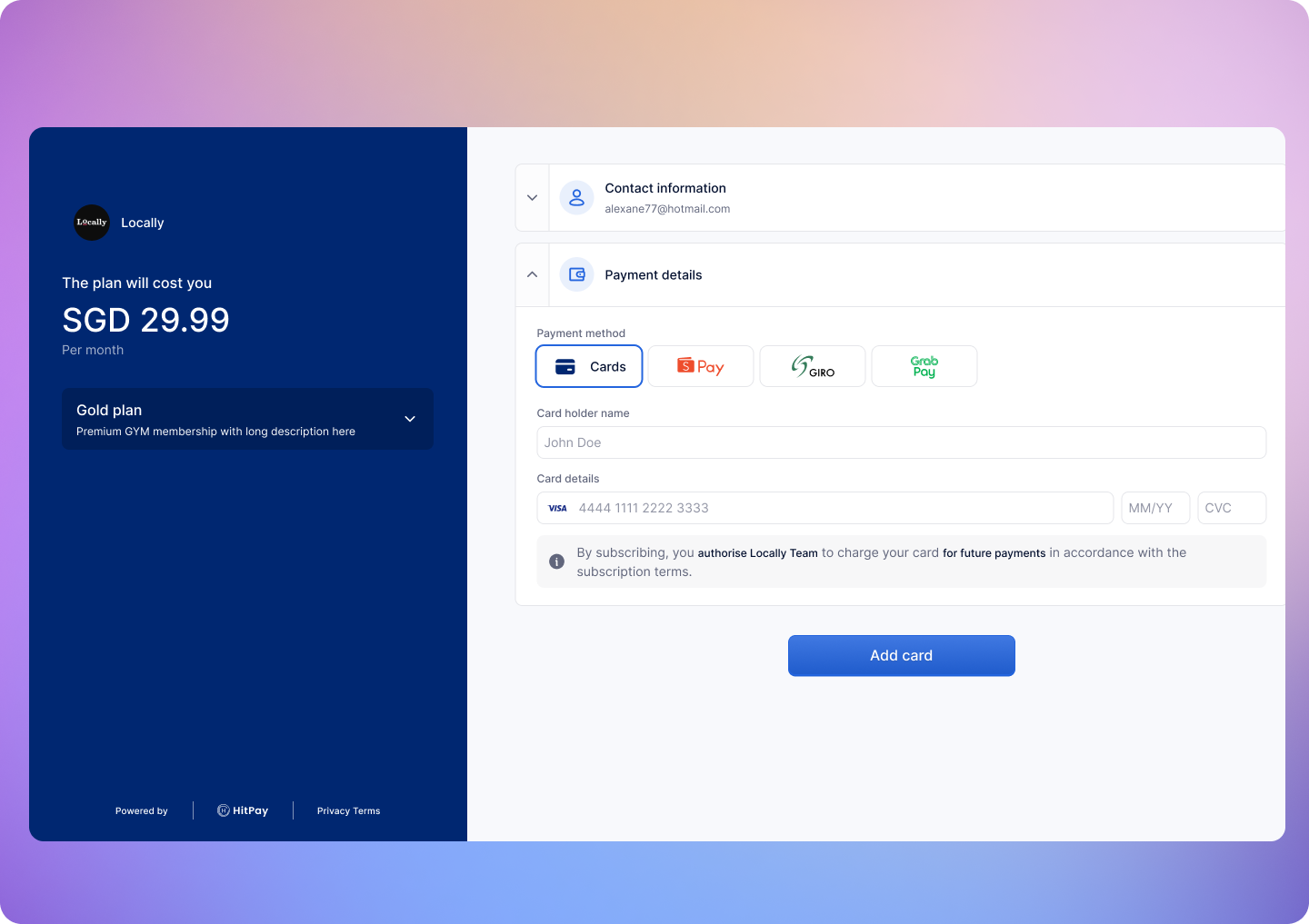 Once the customer completes this flow:
* They are redirected to your `redirect_url`
* Their payment method is now saved and ready to be charged
## Step 3 – Charge the Saved Payment Method
After the customer has attached their payment method, you can charge them anytime by calling the charge API.
### Endpoint
```
POST https://api.sandbox.hit-pay.com/v1/charge/recurring-billing/{id}
```
Replace `{id}` with the billing session ID from Step 1.
### Request Parameters
**Required fields:** `amount` and `currency`
Include header `Content-Type: application/x-www-form-urlencoded`
| Parameter | Description | Example |
| :-------- | :--------------- | :------ |
| amount | Amount to charge | 9.90 |
| currency | Currency code | SGD |
### Example Request
```shell theme={"system"}
curl --location --request POST 'https://api.sandbox.hit-pay.com/v1/charge/recurring-billing/9741164c-06a1-4dd7-a649-72cca8f9603a' \
--header 'X-BUSINESS-API-KEY: your_api_key' \
--header 'X-Requested-With: XMLHttpRequest' \
--header 'Content-Type: application/x-www-form-urlencoded' \
--data-urlencode 'amount=9.90' \
--data-urlencode 'currency=SGD'
```
### Response
```json theme={"system"}
{
"payment_id": "9746f906-bdbb-4064-8372-642cf5877e0c",
"recurring_billing_id": "9746f8c2-2b7c-4c78-8832-012f203ae687",
"amount": 9.9,
"currency": "sgd",
"status": "succeeded"
}
```
You can charge different amounts each time. The `amount` in Step 1 is just for display during the authorization flow—it doesn't limit what you can charge later.
***
## Webhooks
HitPay will send a Webhook POST request when there is a new charge or if there is an error charging the payment method.\
If you are using HitPay APIs to integrate into your app you must mark your order as paid ONLY after the webhook is received and validated.
### Register Your Webhook
1. Navigate to **Developers > Webhook Endpoints** in your dashboard
2. Click on **New Webhook**
3. Enter a name and your webhook URL
4. Select the events you want to receive:
* `charge.created` — When a charge is successfully completed
* `recurring_billing.method_attached` — When a payment method is attached
* `recurring_billing.method_detached` — When a payment method is detached
* `recurring_billing.subscription_updated` — When a billing session is updated, including status changes (active, cancelled, paused, expired)
5. Save your webhook configuration
### Webhook Payload
When a payment is completed, HitPay sends a JSON payload to your registered webhook URL with the following headers:
| HTTP Header | Description |
| ------------------- | ---------------------------------------------------------------- |
| Hitpay-Signature | HMAC-SHA256 signature of the JSON payload, using your salt value |
| Hitpay-Event-Type | `completed` |
| Hitpay-Event-Object | `payment_request` |
| User-Agent | `HitPay v2.0` |
### Sample Webhook Payload
```json theme={"system"}
{
"id": "a1113980-3725-4cad-b6eb-208e18525e00",
"business_id": "9868921e-2c9d-472e-8d66-f532719ab123",
"channel": "recurrent",
"customer_id": "a1113934-b188-4db8-b69e-98059efa3123",
"status": "succeeded",
"customer": {
"name": "Thaisa",
"email": "thaisa@hit-pay.com",
"phone_number": null,
},
"currency": "usd",
"amount": 20,
"home_currency": "usd",
"payment_provider": {
"code": "stripe_sg",
"account_id": "acct_1MYk3LPLxyktaABC",
"charge": {
"type": "charge",
"id": "ch_3T0D6iAMHowMCIhZ2u66zABC",
"method": "card",
"transfer_type": "application_fee",
"details": {
"brand": "Visa",
"last4": "4242",
"country": "United States of America",
"country_code": "us"
},
"logo": "/icons/payment-methods-2/card.svg"
}
},
"created_at": "2026-02-13T11:31:54+08:00",
"updated_at": "2026-02-13T11:31:55+08:00",
"closed_at": "2026-02-13T11:31:54+08:00"
}
```
### Validating the Webhook
To ensure the webhook is authentic, validate the `Hitpay-Signature` header:
1. Receive the JSON payload and `Hitpay-Signature` from the request
2. Use your salt value (from the dashboard) as the secret key
3. Compute HMAC-SHA256 of the JSON payload using your salt
4. Compare the computed signature with `Hitpay-Signature` - they must match
```php PHP theme={"system"}
function validateWebhook($payload, $signature, $salt) {
$computedSignature = hash_hmac('sha256', $payload, $salt);
return hash_equals($computedSignature, $signature);
}
// Usage
$payload = file_get_contents('php://input');
$signature = $_SERVER['HTTP_HITPAY_SIGNATURE'];
$salt = 'your_salt_from_dashboard';
if (validateWebhook($payload, $signature, $salt)) {
$data = json_decode($payload, true);
// Process the payment confirmation
// Mark order as paid
} else {
http_response_code(401);
exit('Invalid signature');
}
```
```javascript NodeJS theme={"system"}
const crypto = require('crypto');
function validateWebhook(payload, signature, salt) {
const computedSignature = crypto
.createHmac('sha256', salt)
.update(payload)
.digest('hex');
return crypto.timingSafeEqual(
Buffer.from(computedSignature),
Buffer.from(signature)
);
}
// Usage in Express
app.post('/webhook', (req, res) => {
const payload = JSON.stringify(req.body);
const signature = req.headers['hitpay-signature'];
const salt = 'your_salt_from_dashboard';
if (validateWebhook(payload, signature, salt)) {
// Process the payment confirmation
// Mark order as paid
res.status(200).send('OK');
} else {
res.status(401).send('Invalid signature');
}
});
```
***
Congrats! You've successfully integrated the Save Payment Method API.
## FAQs
No, hitpay does not support authorization or holding of card
transaction.
Yes, a minimum amount of 1 is required to initiate the save-payment-method session.
Yes, once your customer has attached a payment method to the
subscription, you can charge any amount using the [charge the saved payment method
API](https://docs.hitpayapp.com/apis/guide/save-payment-method-for-billing#step-3-charge-the-saved-payment-method).
Ensure the following before moving to production - Change the base URL
for all API calls to [https://api.hit-pay.com/v1/](https://api.hit-pay.com/v1/) - Update API keys and
Salt values from the production dashboard
The `webhook` parameter in the API is **deprecated** but still functional. We recommend registering your webhook URL in the dashboard instead for richer JSON payloads and support for multiple event types.
Once the customer completes this flow:
* They are redirected to your `redirect_url`
* Their payment method is now saved and ready to be charged
## Step 3 – Charge the Saved Payment Method
After the customer has attached their payment method, you can charge them anytime by calling the charge API.
### Endpoint
```
POST https://api.sandbox.hit-pay.com/v1/charge/recurring-billing/{id}
```
Replace `{id}` with the billing session ID from Step 1.
### Request Parameters
**Required fields:** `amount` and `currency`
Include header `Content-Type: application/x-www-form-urlencoded`
| Parameter | Description | Example |
| :-------- | :--------------- | :------ |
| amount | Amount to charge | 9.90 |
| currency | Currency code | SGD |
### Example Request
```shell theme={"system"}
curl --location --request POST 'https://api.sandbox.hit-pay.com/v1/charge/recurring-billing/9741164c-06a1-4dd7-a649-72cca8f9603a' \
--header 'X-BUSINESS-API-KEY: your_api_key' \
--header 'X-Requested-With: XMLHttpRequest' \
--header 'Content-Type: application/x-www-form-urlencoded' \
--data-urlencode 'amount=9.90' \
--data-urlencode 'currency=SGD'
```
### Response
```json theme={"system"}
{
"payment_id": "9746f906-bdbb-4064-8372-642cf5877e0c",
"recurring_billing_id": "9746f8c2-2b7c-4c78-8832-012f203ae687",
"amount": 9.9,
"currency": "sgd",
"status": "succeeded"
}
```
You can charge different amounts each time. The `amount` in Step 1 is just for display during the authorization flow—it doesn't limit what you can charge later.
***
## Webhooks
HitPay will send a Webhook POST request when there is a new charge or if there is an error charging the payment method.\
If you are using HitPay APIs to integrate into your app you must mark your order as paid ONLY after the webhook is received and validated.
### Register Your Webhook
1. Navigate to **Developers > Webhook Endpoints** in your dashboard
2. Click on **New Webhook**
3. Enter a name and your webhook URL
4. Select the events you want to receive:
* `charge.created` — When a charge is successfully completed
* `recurring_billing.method_attached` — When a payment method is attached
* `recurring_billing.method_detached` — When a payment method is detached
* `recurring_billing.subscription_updated` — When a billing session is updated, including status changes (active, cancelled, paused, expired)
5. Save your webhook configuration
### Webhook Payload
When a payment is completed, HitPay sends a JSON payload to your registered webhook URL with the following headers:
| HTTP Header | Description |
| ------------------- | ---------------------------------------------------------------- |
| Hitpay-Signature | HMAC-SHA256 signature of the JSON payload, using your salt value |
| Hitpay-Event-Type | `completed` |
| Hitpay-Event-Object | `payment_request` |
| User-Agent | `HitPay v2.0` |
### Sample Webhook Payload
```json theme={"system"}
{
"id": "a1113980-3725-4cad-b6eb-208e18525e00",
"business_id": "9868921e-2c9d-472e-8d66-f532719ab123",
"channel": "recurrent",
"customer_id": "a1113934-b188-4db8-b69e-98059efa3123",
"status": "succeeded",
"customer": {
"name": "Thaisa",
"email": "thaisa@hit-pay.com",
"phone_number": null,
},
"currency": "usd",
"amount": 20,
"home_currency": "usd",
"payment_provider": {
"code": "stripe_sg",
"account_id": "acct_1MYk3LPLxyktaABC",
"charge": {
"type": "charge",
"id": "ch_3T0D6iAMHowMCIhZ2u66zABC",
"method": "card",
"transfer_type": "application_fee",
"details": {
"brand": "Visa",
"last4": "4242",
"country": "United States of America",
"country_code": "us"
},
"logo": "/icons/payment-methods-2/card.svg"
}
},
"created_at": "2026-02-13T11:31:54+08:00",
"updated_at": "2026-02-13T11:31:55+08:00",
"closed_at": "2026-02-13T11:31:54+08:00"
}
```
### Validating the Webhook
To ensure the webhook is authentic, validate the `Hitpay-Signature` header:
1. Receive the JSON payload and `Hitpay-Signature` from the request
2. Use your salt value (from the dashboard) as the secret key
3. Compute HMAC-SHA256 of the JSON payload using your salt
4. Compare the computed signature with `Hitpay-Signature` - they must match
```php PHP theme={"system"}
function validateWebhook($payload, $signature, $salt) {
$computedSignature = hash_hmac('sha256', $payload, $salt);
return hash_equals($computedSignature, $signature);
}
// Usage
$payload = file_get_contents('php://input');
$signature = $_SERVER['HTTP_HITPAY_SIGNATURE'];
$salt = 'your_salt_from_dashboard';
if (validateWebhook($payload, $signature, $salt)) {
$data = json_decode($payload, true);
// Process the payment confirmation
// Mark order as paid
} else {
http_response_code(401);
exit('Invalid signature');
}
```
```javascript NodeJS theme={"system"}
const crypto = require('crypto');
function validateWebhook(payload, signature, salt) {
const computedSignature = crypto
.createHmac('sha256', salt)
.update(payload)
.digest('hex');
return crypto.timingSafeEqual(
Buffer.from(computedSignature),
Buffer.from(signature)
);
}
// Usage in Express
app.post('/webhook', (req, res) => {
const payload = JSON.stringify(req.body);
const signature = req.headers['hitpay-signature'];
const salt = 'your_salt_from_dashboard';
if (validateWebhook(payload, signature, salt)) {
// Process the payment confirmation
// Mark order as paid
res.status(200).send('OK');
} else {
res.status(401).send('Invalid signature');
}
});
```
***
Congrats! You've successfully integrated the Save Payment Method API.
## FAQs
No, hitpay does not support authorization or holding of card
transaction.
Yes, a minimum amount of 1 is required to initiate the save-payment-method session.
Yes, once your customer has attached a payment method to the
subscription, you can charge any amount using the [charge the saved payment method
API](https://docs.hitpayapp.com/apis/guide/save-payment-method-for-billing#step-3-charge-the-saved-payment-method).
Ensure the following before moving to production - Change the base URL
for all API calls to [https://api.hit-pay.com/v1/](https://api.hit-pay.com/v1/) - Update API keys and
Salt values from the production dashboard
The `webhook` parameter in the API is **deprecated** but still functional. We recommend registering your webhook URL in the dashboard instead for richer JSON payloads and support for multiple event types.