> ## Documentation Index
> Fetch the complete documentation index at: https://docs.hitpayapp.com/llms.txt
> Use this file to discover all available pages before exploring further.
# Sandbox
> Learn how to create and use a sandbox account for testing your HitPay integrations
# Sandbox Environment
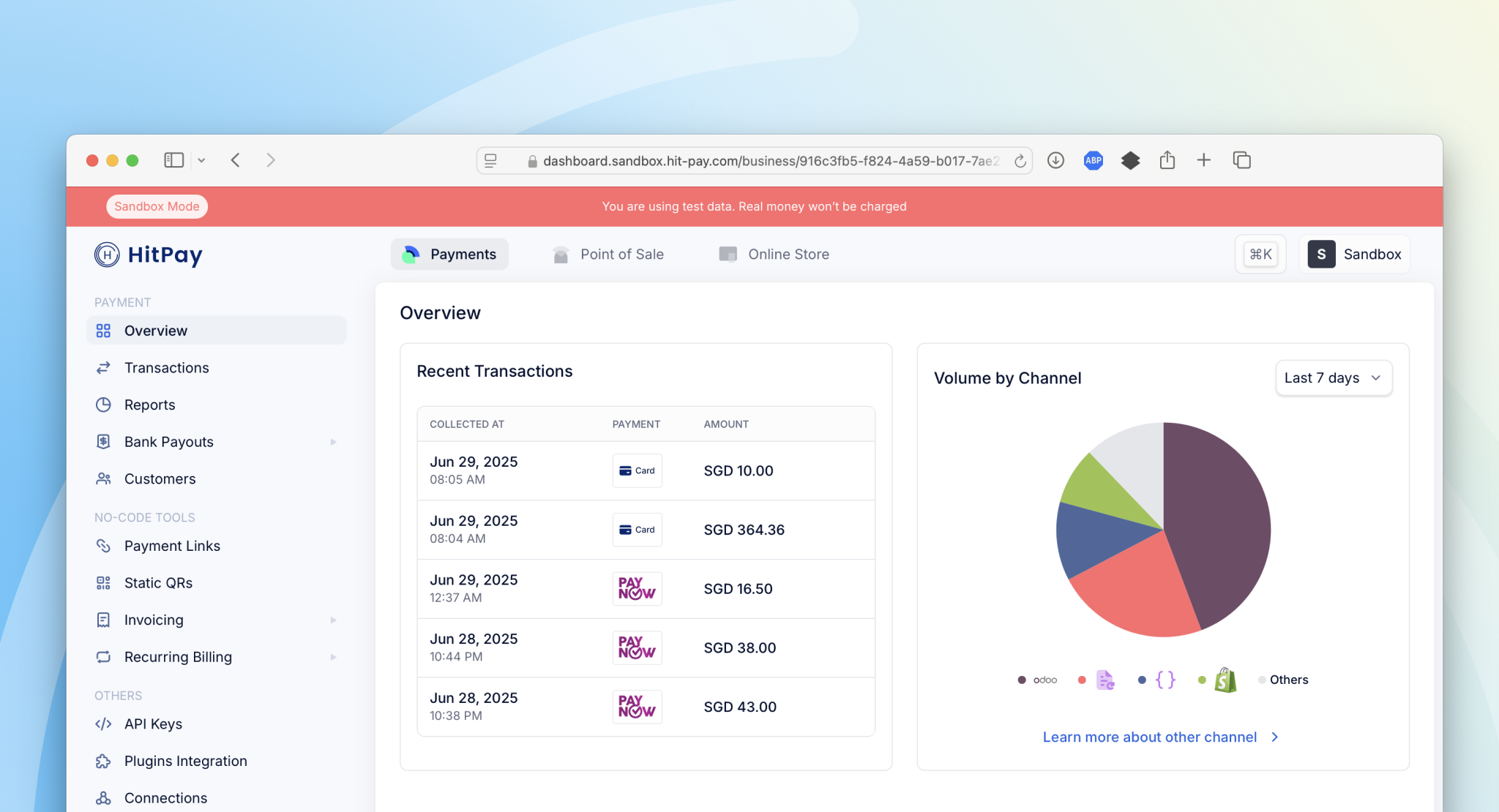
The HitPay sandbox environment allows developers to simulate payment flows without processing real transactions. It is essential for testing and debugging before moving to production.
 ### Important Notes
* Sandbox and production are **completely separate accounts**
* You can use **dummy business details** when signing up for sandbox
* No verification or approval is required
* Choose **Singapore** as your business country
* Sandbox supports **PayNow**, **cards**, **GrabPay**, **GrabPay PayLater**, **ShopeePay**, **Atome**, and **DOKU QRIS**
## Creating a Sandbox Account
Visit the [Sandbox Account Creation Page](https://dashboard.sandbox.hit-pay.com/register) and enter test details (no real data required). Verify your email address to activate the account.
Log in at [https://dashboard.sandbox.hit-pay.com/login](https://dashboard.sandbox.hit-pay.com/login). The interface is identical to production, but uses test data.
Go to **Settings → Payment Methods** and enable the payment methods you want to test. Sandbox supports PayNow, cards, ShopeePay, GrabPay, GrabPay PayLater, Atome, and DOKU QRIS.
Navigate to **Settings** → **API Keys** and generate new keys for use in development. Use these only with the sandbox API URL.
## Sandbox Features
### Supported Payment Methods
* Credit and debit cards
* PayNow (via QR code)
* ShopeePay
* GrabPay
* GrabPay PayLater
* Atome
* DOKU QRIS
### Simulated Behavior
* All transactions are test-only; no real charges occur
* Webhook events are triggered to your test endpoints
* API responses mirror the production system
### Request Logs
The sandbox environment provides a request logging feature that allows you to monitor and debug all HTTP requests sent to your account. Access this feature by navigating to **Developers** → **Request Logs** in the sandbox dashboard.
### Important Notes
* Sandbox and production are **completely separate accounts**
* You can use **dummy business details** when signing up for sandbox
* No verification or approval is required
* Choose **Singapore** as your business country
* Sandbox supports **PayNow**, **cards**, **GrabPay**, **GrabPay PayLater**, **ShopeePay**, **Atome**, and **DOKU QRIS**
## Creating a Sandbox Account
Visit the [Sandbox Account Creation Page](https://dashboard.sandbox.hit-pay.com/register) and enter test details (no real data required). Verify your email address to activate the account.
Log in at [https://dashboard.sandbox.hit-pay.com/login](https://dashboard.sandbox.hit-pay.com/login). The interface is identical to production, but uses test data.
Go to **Settings → Payment Methods** and enable the payment methods you want to test. Sandbox supports PayNow, cards, ShopeePay, GrabPay, GrabPay PayLater, Atome, and DOKU QRIS.
Navigate to **Settings** → **API Keys** and generate new keys for use in development. Use these only with the sandbox API URL.
## Sandbox Features
### Supported Payment Methods
* Credit and debit cards
* PayNow (via QR code)
* ShopeePay
* GrabPay
* GrabPay PayLater
* Atome
* DOKU QRIS
### Simulated Behavior
* All transactions are test-only; no real charges occur
* Webhook events are triggered to your test endpoints
* API responses mirror the production system
### Request Logs
The sandbox environment provides a request logging feature that allows you to monitor and debug all HTTP requests sent to your account. Access this feature by navigating to **Developers** → **Request Logs** in the sandbox dashboard.
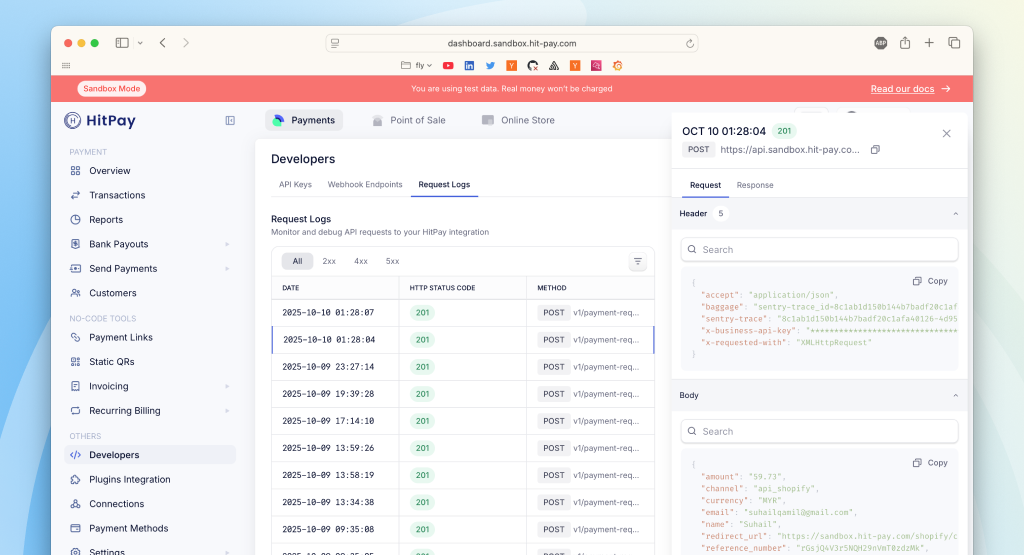 This feature enables you to:
* View all API requests made to your sandbox account
* See detailed request headers, body, and response data
* Filter requests by HTTP status code (2xx, 4xx, 5xx)
## Test Cards
Use the following card numbers to simulate various payment outcomes:
| Card Type | Number | Expiry | CVC | Description |
| ---------------- | ------------------- | --------------- | ------------ | -------------------- |
| Visa | 4242 4242 4242 4242 | Any future date | Any 3 digits | Successful payment |
| Visa (Declined) | 4000 0000 0000 0002 | Any future date | Any 3 digits | Declined transaction |
| Mastercard | 5555 5555 5555 4444 | Any future date | Any 3 digits | Successful payment |
| American Express | 3782 822463 10005 | Any future date | Any 4 digits | Successful payment |
## Test QR Payments
To simulate a QR-based payment (PayNow, ShopeePay, GrabPay, GrabPay PayLater, Atome, or DOKU QRIS):
* Start a transaction using the sandbox dashboard or API
* When prompted, a QR code will be generated
* Use your mobile phone camera (not a payment app) to scan the QR code
* The transaction will automatically simulate a successful payment
## Test Recurring Billing and Saved Payment Methods
Sandbox supports the full mock flow for [Save Payment Method](/apis/guide/save-payment-method) and [Recurring Billing](/apis/guide/recurring-billing) for the following wallets:
| Payment Method | Method Code |
| :------------- | :--------------- |
| ShopeePay | `shopee_pay` |
| GrabPay | `grabpay_direct` |
| Touch 'n Go | `touch_n_go` |
To test:
* Call `POST /v1/recurring-billing` with `save_payment_method=true`, one `payment_methods[]` entry from the table above, and `generate_direct_link=true` (see [Embedded Recurring APMs](/apis/guide/embedded-recurring-billing) for the full request shape)
* Open the `direct_link.direct_link_url` returned in the response in your browser to simulate the customer authorising the wallet
* HitPay fires `recurring_billing.method_attached` once the wallet is linked
* Call `POST /v1/charge/recurring-billing/{id}` to simulate off-session and recurring charges against the saved method, with `charge.created` and `charge.failed` webhooks firing as in production
### Webhook Configuration
* Use separate webhook URLs for sandbox and production environments
* Webhooks in sandbox are sent to your test endpoints
* Webhooks in production are sent to your live endpoints
**IP Addresses to Allowlist**\
If your system requires allowlisting for incoming webhooks, ensure the following IPs are permitted:
* **Production Webhooks**: `3.1.13.32`, `52.77.254.34`
* **Sandbox Webhooks**: `54.179.156.147`
### Switching Between Sandbox and Production
```bash theme={"system"}
# API Endpoints and Variables
# Sandbox
HITPAY_API_KEY=your_sandbox_api_key
HITPAY_API_URL=https://api.sandbox.hit-pay.com
# Production
HITPAY_API_KEY=your_production_api_key
HITPAY_API_URL=https://api.hit-pay.com
```
## FAQs
The sandbox supports cards, PayNow, ShopeePay, GrabPay, GrabPay PayLater, Atome, and DOKU QRIS. For payment methods not yet available in sandbox, the integration approach is identical — simply swap the API key, base URL, and payment method parameter when moving to production.
No, they are separate accounts. Sandbox and production environments are completely independent, and you cannot convert between them. You'll need to create a separate production account when you're ready to go live.
This feature enables you to:
* View all API requests made to your sandbox account
* See detailed request headers, body, and response data
* Filter requests by HTTP status code (2xx, 4xx, 5xx)
## Test Cards
Use the following card numbers to simulate various payment outcomes:
| Card Type | Number | Expiry | CVC | Description |
| ---------------- | ------------------- | --------------- | ------------ | -------------------- |
| Visa | 4242 4242 4242 4242 | Any future date | Any 3 digits | Successful payment |
| Visa (Declined) | 4000 0000 0000 0002 | Any future date | Any 3 digits | Declined transaction |
| Mastercard | 5555 5555 5555 4444 | Any future date | Any 3 digits | Successful payment |
| American Express | 3782 822463 10005 | Any future date | Any 4 digits | Successful payment |
## Test QR Payments
To simulate a QR-based payment (PayNow, ShopeePay, GrabPay, GrabPay PayLater, Atome, or DOKU QRIS):
* Start a transaction using the sandbox dashboard or API
* When prompted, a QR code will be generated
* Use your mobile phone camera (not a payment app) to scan the QR code
* The transaction will automatically simulate a successful payment
## Test Recurring Billing and Saved Payment Methods
Sandbox supports the full mock flow for [Save Payment Method](/apis/guide/save-payment-method) and [Recurring Billing](/apis/guide/recurring-billing) for the following wallets:
| Payment Method | Method Code |
| :------------- | :--------------- |
| ShopeePay | `shopee_pay` |
| GrabPay | `grabpay_direct` |
| Touch 'n Go | `touch_n_go` |
To test:
* Call `POST /v1/recurring-billing` with `save_payment_method=true`, one `payment_methods[]` entry from the table above, and `generate_direct_link=true` (see [Embedded Recurring APMs](/apis/guide/embedded-recurring-billing) for the full request shape)
* Open the `direct_link.direct_link_url` returned in the response in your browser to simulate the customer authorising the wallet
* HitPay fires `recurring_billing.method_attached` once the wallet is linked
* Call `POST /v1/charge/recurring-billing/{id}` to simulate off-session and recurring charges against the saved method, with `charge.created` and `charge.failed` webhooks firing as in production
### Webhook Configuration
* Use separate webhook URLs for sandbox and production environments
* Webhooks in sandbox are sent to your test endpoints
* Webhooks in production are sent to your live endpoints
**IP Addresses to Allowlist**\
If your system requires allowlisting for incoming webhooks, ensure the following IPs are permitted:
* **Production Webhooks**: `3.1.13.32`, `52.77.254.34`
* **Sandbox Webhooks**: `54.179.156.147`
### Switching Between Sandbox and Production
```bash theme={"system"}
# API Endpoints and Variables
# Sandbox
HITPAY_API_KEY=your_sandbox_api_key
HITPAY_API_URL=https://api.sandbox.hit-pay.com
# Production
HITPAY_API_KEY=your_production_api_key
HITPAY_API_URL=https://api.hit-pay.com
```
## FAQs
The sandbox supports cards, PayNow, ShopeePay, GrabPay, GrabPay PayLater, Atome, and DOKU QRIS. For payment methods not yet available in sandbox, the integration approach is identical — simply swap the API key, base URL, and payment method parameter when moving to production.
No, they are separate accounts. Sandbox and production environments are completely independent, and you cannot convert between them. You'll need to create a separate production account when you're ready to go live.