> ## Documentation Index
> Fetch the complete documentation index at: https://docs.hitpayapp.com/llms.txt
> Use this file to discover all available pages before exploring further.
# Recurring Billing
> Integrate the recurring billing APIs to automated your subscription payments
Recurring Billing APIs are the simplest way to start collecting your monthly or yearly subscription fees automatically.
This API integration includes 4 Steps
The first step is to create a subscription plan with details and pricing.
Once the subscription plan is defined, set up recurring billing for the customer.
Present the checkout user interface to the customer for subscription confirmation.
After the customer confirms, handle payment processing and schedule recurring charges.
## Step 1 - Create a subscription plan
A subscription plan consists of basic information like plan name, amount, and frequency. An example of a subscription plan could be "Spotify Premium" which is SGD 9.90 monthly.
### HTTP Request
```
POST https://api.sandbox.hit-pay.com/v1/subscription-plan
```
### Query Parameters
Mandatory fields are `name`, `cycle` and `amount`. Remember to include header `Content-Type: application/x-www-form-urlencoded`
| Parameter | Description | Example |
| ---------------- | -------------------------------------------------------------------------------------------------------------------------------------------------------------- | ---------------------------- |
| name | Plan name | Spotify Premium |
| description | The description of the subscription plan | Spotify Monthly Subscription |
| cycle | Billing frequency (weekly / monthly / yearly / custom / save\_card). If cycle = custom then the user has to send the fields cycle\_repeat and cycle\_frequency | monthly |
| cycle\_repeat | \[This field is only applicable when cycle = custom] It's the number of times the cycle will repeat. | 4 |
| cycle\_frequency | \[This field is only applicable when cycle = custom] It's the frequency of the cycle \[day / week / month / year] | week |
| currency | Currency related to the recurring billing | SGD |
| amount | Amount related to the recurring billing | 9.90 |
| reference | Arbitrary reference number that you can map to your internal reference number. This value cannot be edited by the customer | XXXX123 |
```shell shell theme={"system"}
curl --location --request POST 'https://api.sandbox.hit-pay.com/v1/subscription-plan' \
--header 'X-BUSINESS-API-KEY: meowmeowmeow' \
--header 'X-Requested-With: XMLHttpRequest' \
--header 'Content-Type: application/x-www-form-urlencoded' \
--data-urlencode 'name=Spotify Premium' \
--data-urlencode 'description=Spotify Monthly Subscription' \
--data-urlencode 'currency=SGD' \
--data-urlencode 'amount=9.90' \
--data-urlencode 'cycle=monthly' \
--data-urlencode 'reference=spotify_premium_2022'
```
```php PHP theme={"system"}
request('POST', 'https://api.staging.hit-pay.com/v1/subscription-plan', [
'form_params' =>[
'name' => 'Spotify Premium',
'description' => 'Spotify Monthly Subscription',
'currency' => 'SGD'
'amount' => 9.90,
'cycle' => 'monthly',
'reference' => 'spotify_premium_2022'
],
'headers' => [
'Content-Type' => 'application/x-www-form-urlencoded',
'X-Requested-With' => 'XMLHttpRequest',
'accept' => 'application/json',
'x-api-key' => 'meowmeowmeow',
],
]);
echo $response->getBody();
```
### Response
```json theme={"system"}
{
"id": "973ee344-6737-4897-9929-edbc9d7bf433",
"name": "Spotify Premium",
"description": "Spotify Monthly Subscription",
"cycle": "monthly",
"cycle_repeat": null,
"cycle_frequency": null,
"currency": "sgd",
"amount": 9.90,
"reference": "spotify_premium_2022",
"created_at": "2022-09-12T14:19:26",
"updated_at": "2022-09-12T14:19:26"
}
```
## Step 2 - Create a recurring billing for the customer
Once your customer has decided to start the subscription this endpoint will create the recurring billing request.\
Since this is a server-to-server communication, if you have a mobile or Web client that communicates with your REST API, you must have a new endpoint E.g. /create-subscription or reuse an existing endpoint. This endpoint will be responsible for making the recurring billing API call to hitpay.
### HTTP Request
```
POST https://api.sandbox.hit-pay.com/v1/recurring-billing
```
### Query Parameters
Mandatory fields are `plan_id`, `customer_email`, and `start_date`.
If you would like to create a subscription without a plan, you need to send `plan_id = null` and the following mandatory fields: `name`, `cycle`, `amount`, `customer_email`, and `start_date`. Remember to include the header `Content-Type: application/x-www-form-urlencoded`.
| Parameter | Description | Example |
| ---------------------- | --------------------------------------------------------------------------------------------------------------- | ---------------------------------------------------------------------------------------- |
| plan\_id | Subscription plan id created from step 1 | 973ee344-6737-4897-9929-edbc9d7bf433 |
| customer\_email | Customer email | [paul@hitpayapp.com](mailto:paul@hitpayapp.com) |
| customer\_name | Customer name | Paul |
| start\_date | Billing start date (YYYY-MM-DD) in SGT | 2022-11-11 |
| amount | By default, the amount from the subscription plan will be used. Use this parameter for discounts for customers. | 7.90 |
| currency | Currency related to the recurring billing | SGD |
| payment\_methods\[] | Choice of payment methods you want to offer the customer | giro, card |
| redirect\_url | URL where hitpay redirects the user after the user enters card details and the subscription is active. | [https://spotify.com/subscription-completed](https://spotify.com/subscription-completed) |
| reference | Arbitrary reference number for mapping purposes. Customer cannot edit this value. | XXXX123 |
| send\_email | Hitpay sends email receipts to the customer. Default value is false. | true |
| times\_to\_be\_charged | Number of times to charge the customer. | 3 |
## Step 3 - Redirect customer to recurring billing page (One time set up)
Redirect the customer to the "url" value.
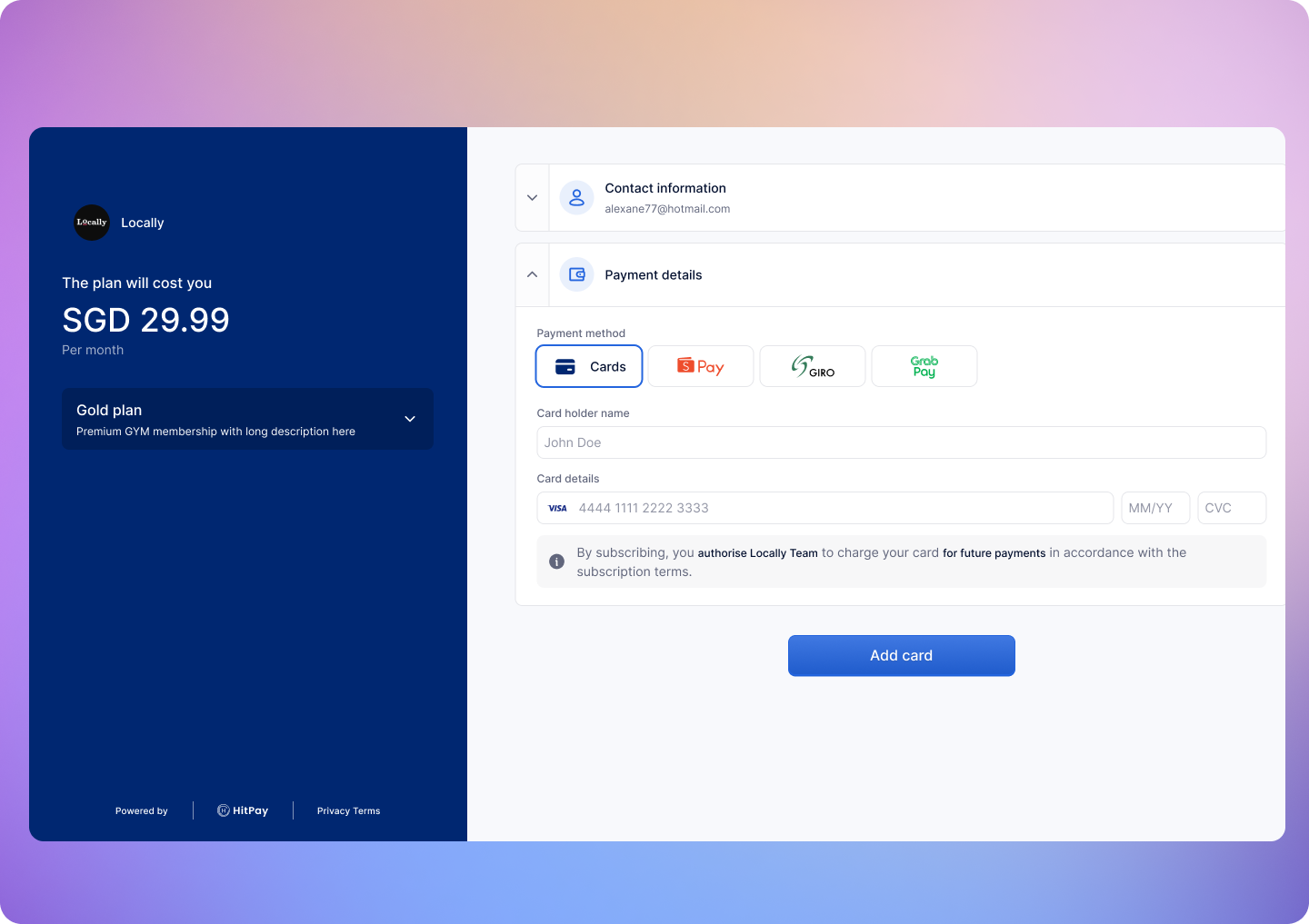 Once the customer completes the payment information it will be redirect to "redirect\_url"
## Step 4: Handle Successful Payment
## Webhooks
HitPay will send a Webhook POST request when there is a new charge or if there is an error charging the payment method.\
If you are using HitPay APIs to integrate into your app you must mark your order as paid ONLY after the webhook is received and validated.
### Register Your Webhook
1. Navigate to **Developers > Webhook Endpoints** in your dashboard
2. Click on **New Webhook**
3. Enter a name and your webhook URL
4. Select the recurring billing events you want to receive:
* `charge.created` — When a recurring charge is successfully completed
* `recurring_billing.method_attached` — When a payment method (card or APM) is attached
* `recurring_billing.method_detached` — When a payment method is detached
* `recurring_billing.subscription_updated` — When a subscription is updated, including status changes (active, cancelled, paused, expired)
5. Save your webhook configuration
### Webhook Payload
When a payment is completed, HitPay sends a JSON payload to your registered webhook URL with the following headers:
| HTTP Header | Description |
| ------------------- | ---------------------------------------------------------------- |
| Hitpay-Signature | HMAC-SHA256 signature of the JSON payload, using your salt value |
| Hitpay-Event-Type | `completed` |
| Hitpay-Event-Object | `payment_request` |
| User-Agent | `HitPay v2.0` |
### Sample Webhook Payload
```json theme={"system"}
{
"id": "a1113980-3725-4cad-b6eb-208e18525e00",
"business_id": "9868921e-2c9d-472e-8d66-f532719ab123",
"channel": "recurrent",
"customer_id": "a1113934-b188-4db8-b69e-98059efa3123",
"status": "succeeded",
"customer": {
"name": "Thaisa",
"email": "thaisa@hit-pay.com",
"phone_number": null,
},
"currency": "usd",
"amount": 20,
"home_currency": "usd",
"payment_provider": {
"code": "stripe_sg",
"account_id": "acct_1MYk3LPLxyktaABC",
"charge": {
"type": "charge",
"id": "ch_3T0D6iAMHowMCIhZ2u66zABC",
"method": "card",
"transfer_type": "application_fee",
"details": {
"brand": "Visa",
"last4": "4242",
"country": "United States of America",
"country_code": "us"
},
"logo": "/icons/payment-methods-2/card.svg"
}
},
"created_at": "2026-02-13T11:31:54+08:00",
"updated_at": "2026-02-13T11:31:55+08:00",
"closed_at": "2026-02-13T11:31:54+08:00"
}
```
### Validating the Webhook
To ensure the webhook is authentic, validate the `Hitpay-Signature` header:
1. Receive the JSON payload and `Hitpay-Signature` from the request
2. Use your salt value (from the dashboard) as the secret key
3. Compute HMAC-SHA256 of the JSON payload using your salt
4. Compare the computed signature with `Hitpay-Signature` - they must match
```php PHP theme={"system"}
function validateWebhook($payload, $signature, $salt) {
$computedSignature = hash_hmac('sha256', $payload, $salt);
return hash_equals($computedSignature, $signature);
}
// Usage
$payload = file_get_contents('php://input');
$signature = $_SERVER['HTTP_HITPAY_SIGNATURE'];
$salt = 'your_salt_from_dashboard';
if (validateWebhook($payload, $signature, $salt)) {
$data = json_decode($payload, true);
// Process the payment confirmation
// Mark order as paid
} else {
http_response_code(401);
exit('Invalid signature');
}
```
```javascript NodeJS theme={"system"}
const crypto = require('crypto');
function validateWebhook(payload, signature, salt) {
const computedSignature = crypto
.createHmac('sha256', salt)
.update(payload)
.digest('hex');
return crypto.timingSafeEqual(
Buffer.from(computedSignature),
Buffer.from(signature)
);
}
// Usage in Express
app.post('/webhook', (req, res) => {
const payload = JSON.stringify(req.body);
const signature = req.headers['hitpay-signature'];
const salt = 'your_salt_from_dashboard';
if (validateWebhook(payload, signature, salt)) {
// Process the payment confirmation
// Mark order as paid
res.status(200).send('OK');
} else {
res.status(401).send('Invalid signature');
}
});
```
Congrats! You have now successfully completed the recurring billing integration.
## FAQs
If an attached card associated with a plan gets declined on the scheduled charge date of the plan, the customer is immediately sent an email requesting them to update their card details using the link.
At the same time, the merchant is also notified by email about the failed charge.
If the customer fails to attach a valid card within 7 days from the failed charge date, the subscription will move to an inactive status.
The scheduled customer subscription will be canceled if the customer hasn't entered their payment details by the billing start date.
Yes, you can reuse the same subscription by calling the [Update recurring billing](/apis/recurring-billing/update-billing) API and setting a future start date.
Possible reasons for wrong hmac value generated
* Ensure that you are using the correct salt value from the correct environment (Sandbox or Production)
* Make sure NOT to include the hamc value when calculating the hmac
* Make sure all the values stated above are included in the payload including reference\_number. Use an empty string if the value does not exist
Possible reasons for this error:
* You are using a production key in the sandbox or a sandbox key in production. Make sure the API base URL is correct.
* You are missing headers. Ensure that you include both the 'Content-Type' and 'X-Requested-With' headers. Refer to this [section](/apis/guide/online-payments#authentication) again.
Ensure the following before moving to production
* Change the base URL for all API calls to [https://api.hit-pay.com/v1/](https://api.hit-pay.com/v1/)
* Update API keys and Salt values from the production dashboard
The `webhook` parameter in the API is **deprecated** but still functional. We recommend registering your webhook URL in the dashboard instead for richer JSON payloads and support for multiple event types.
Once the customer completes the payment information it will be redirect to "redirect\_url"
## Step 4: Handle Successful Payment
## Webhooks
HitPay will send a Webhook POST request when there is a new charge or if there is an error charging the payment method.\
If you are using HitPay APIs to integrate into your app you must mark your order as paid ONLY after the webhook is received and validated.
### Register Your Webhook
1. Navigate to **Developers > Webhook Endpoints** in your dashboard
2. Click on **New Webhook**
3. Enter a name and your webhook URL
4. Select the recurring billing events you want to receive:
* `charge.created` — When a recurring charge is successfully completed
* `recurring_billing.method_attached` — When a payment method (card or APM) is attached
* `recurring_billing.method_detached` — When a payment method is detached
* `recurring_billing.subscription_updated` — When a subscription is updated, including status changes (active, cancelled, paused, expired)
5. Save your webhook configuration
### Webhook Payload
When a payment is completed, HitPay sends a JSON payload to your registered webhook URL with the following headers:
| HTTP Header | Description |
| ------------------- | ---------------------------------------------------------------- |
| Hitpay-Signature | HMAC-SHA256 signature of the JSON payload, using your salt value |
| Hitpay-Event-Type | `completed` |
| Hitpay-Event-Object | `payment_request` |
| User-Agent | `HitPay v2.0` |
### Sample Webhook Payload
```json theme={"system"}
{
"id": "a1113980-3725-4cad-b6eb-208e18525e00",
"business_id": "9868921e-2c9d-472e-8d66-f532719ab123",
"channel": "recurrent",
"customer_id": "a1113934-b188-4db8-b69e-98059efa3123",
"status": "succeeded",
"customer": {
"name": "Thaisa",
"email": "thaisa@hit-pay.com",
"phone_number": null,
},
"currency": "usd",
"amount": 20,
"home_currency": "usd",
"payment_provider": {
"code": "stripe_sg",
"account_id": "acct_1MYk3LPLxyktaABC",
"charge": {
"type": "charge",
"id": "ch_3T0D6iAMHowMCIhZ2u66zABC",
"method": "card",
"transfer_type": "application_fee",
"details": {
"brand": "Visa",
"last4": "4242",
"country": "United States of America",
"country_code": "us"
},
"logo": "/icons/payment-methods-2/card.svg"
}
},
"created_at": "2026-02-13T11:31:54+08:00",
"updated_at": "2026-02-13T11:31:55+08:00",
"closed_at": "2026-02-13T11:31:54+08:00"
}
```
### Validating the Webhook
To ensure the webhook is authentic, validate the `Hitpay-Signature` header:
1. Receive the JSON payload and `Hitpay-Signature` from the request
2. Use your salt value (from the dashboard) as the secret key
3. Compute HMAC-SHA256 of the JSON payload using your salt
4. Compare the computed signature with `Hitpay-Signature` - they must match
```php PHP theme={"system"}
function validateWebhook($payload, $signature, $salt) {
$computedSignature = hash_hmac('sha256', $payload, $salt);
return hash_equals($computedSignature, $signature);
}
// Usage
$payload = file_get_contents('php://input');
$signature = $_SERVER['HTTP_HITPAY_SIGNATURE'];
$salt = 'your_salt_from_dashboard';
if (validateWebhook($payload, $signature, $salt)) {
$data = json_decode($payload, true);
// Process the payment confirmation
// Mark order as paid
} else {
http_response_code(401);
exit('Invalid signature');
}
```
```javascript NodeJS theme={"system"}
const crypto = require('crypto');
function validateWebhook(payload, signature, salt) {
const computedSignature = crypto
.createHmac('sha256', salt)
.update(payload)
.digest('hex');
return crypto.timingSafeEqual(
Buffer.from(computedSignature),
Buffer.from(signature)
);
}
// Usage in Express
app.post('/webhook', (req, res) => {
const payload = JSON.stringify(req.body);
const signature = req.headers['hitpay-signature'];
const salt = 'your_salt_from_dashboard';
if (validateWebhook(payload, signature, salt)) {
// Process the payment confirmation
// Mark order as paid
res.status(200).send('OK');
} else {
res.status(401).send('Invalid signature');
}
});
```
Congrats! You have now successfully completed the recurring billing integration.
## FAQs
If an attached card associated with a plan gets declined on the scheduled charge date of the plan, the customer is immediately sent an email requesting them to update their card details using the link.
At the same time, the merchant is also notified by email about the failed charge.
If the customer fails to attach a valid card within 7 days from the failed charge date, the subscription will move to an inactive status.
The scheduled customer subscription will be canceled if the customer hasn't entered their payment details by the billing start date.
Yes, you can reuse the same subscription by calling the [Update recurring billing](/apis/recurring-billing/update-billing) API and setting a future start date.
Possible reasons for wrong hmac value generated
* Ensure that you are using the correct salt value from the correct environment (Sandbox or Production)
* Make sure NOT to include the hamc value when calculating the hmac
* Make sure all the values stated above are included in the payload including reference\_number. Use an empty string if the value does not exist
Possible reasons for this error:
* You are using a production key in the sandbox or a sandbox key in production. Make sure the API base URL is correct.
* You are missing headers. Ensure that you include both the 'Content-Type' and 'X-Requested-With' headers. Refer to this [section](/apis/guide/online-payments#authentication) again.
Ensure the following before moving to production
* Change the base URL for all API calls to [https://api.hit-pay.com/v1/](https://api.hit-pay.com/v1/)
* Update API keys and Salt values from the production dashboard
The `webhook` parameter in the API is **deprecated** but still functional. We recommend registering your webhook URL in the dashboard instead for richer JSON payloads and support for multiple event types.