> ## Documentation Index
> Fetch the complete documentation index at: https://docs.hitpayapp.com/llms.txt
> Use this file to discover all available pages before exploring further.
# Payouts
> Simple guide for initiating payouts using HitPay API
This API is currently in beta. Please use with caution and expect potential changes.
## Overview
This guide shows how to initiate payouts using HitPay's transfer API. It's an essential tool for platforms and businesses that need to pay suppliers or other entities.
## Example Use Cases
These APIs are designed for a variety of payment scenarios, including:
* Paying suppliers
* Employee payroll
* Automating commission payouts to partners
## Flow of Funds
When you initiate a transfer, funds are deducted from your **HitPay wallet balance**. Your wallet can hold balances in multiple currencies such as SGD, USD, etc. The API uses the `source_currency` field to deduct from the corresponding wallet.
Funds can be added to your wallet through:
* **Accepting payments using HitPay** (e.g., through your checkout or POS)
* **Manual top-ups via the HitPay Dashboard**
### Example: PayNow Transfer from SGD Wallet
The diagram below illustrates how funds are deducted during a PayNow transfer:
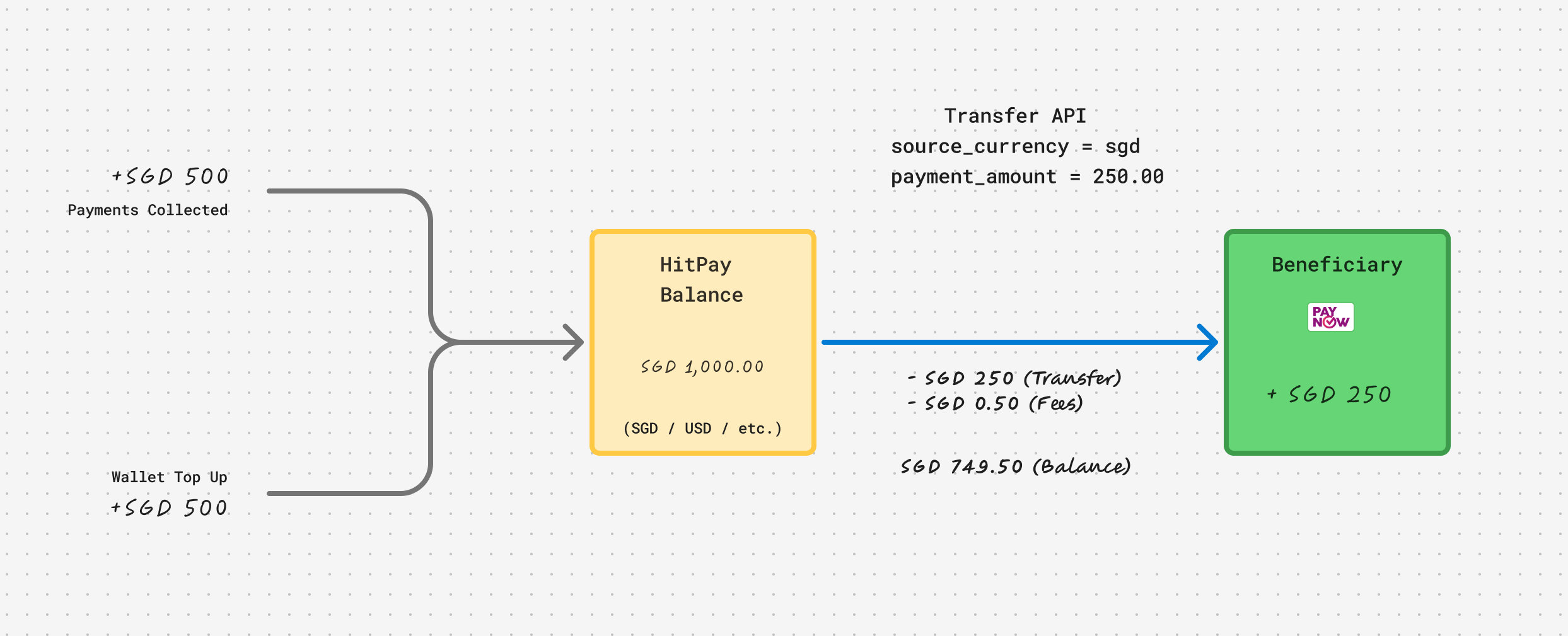 * Total wallet balance: SGD 1,000
* PayNow transfer: SGD 250
* Transfer fee: SGD 0.50
* Remaining balance: SGD 749.50
You can also initiate transfers from other balances like USD if supported for the payout method.
### Endpoint
```
POST /v1/transfers
```
### Required Fields
| Field | Description |
| ----------------- | ------------------------------------- |
| `beneficiary` | Inline object or `beneficiary_id` |
| `source_currency` | Currency to deduct from (e.g., `sgd`) |
| `payment_amount` | Amount to transfer |
Below is a sample request body to initiate a transfer using FAST (SGD).
```json theme={"system"}
{
"source_currency": "sgd",
"payment_amount": 250.00,
"beneficiary": {
"country":"sg",
"transfer_method":"bank_transfer",
"transfer_type":"local",
"currency":"sgd",
"holder_type":"individual",
"holder_name":"Paper Company",
"bank_swift_code":"DBSSSGSGXXX",
"account_number":"123456789012"
}
}
```
### Transfer API Response
Upon successfully initiating a transfer, the API returns a JSON object containing the details of the transfer. Below is a sample response:
```
{
"id": "b176a1e2-47cf-4a0f-8732-8f0f6dc2387d",
"beneficiary": {
"id": "73fbc1d9-1d28-495a-8a56-2c183045d305",
"status": "approved",
"country": "sg",
"transfer_method": "bank_transfer",
"transfer_type": "local",
"currency": "sgd",
"holder_type": "individual",
"holder_name": "Paper Company",
"bank_swift_code": "DBSSSGSGXXX",
"account_number": "123456789012",
"created_at": "2025-04-23T12:45:22+08:00",
"updated_at": "2025-04-23T12:45:23+08:00"
},
"payment_currency": "sgd",
"payment_amount": 250.00,
"source_currency": "sgd",
"source_amount": 250.00,
"exchange_rate": null,
"fee_payer": "payer",
"total_fee": 0.50,
"fee_currency": "sgd",
"status": "scheduled",
"created_at": "2025-04-23T12:46:01+08:00"
}
```
## Supported Payout Corridors
The following corridors are currently supported for payouts:
| Country | Currency | Rail | Settlement | Transfer Methods |
| :---------- | :------- | :---- | :--------- | :------------------------------ |
| Singapore | SGD | FAST | T+1 | Bank transfer |
| Malaysia | MYR | Local | T+1 | Bank transfer |
| Philippines | PHP | Local | T+1 | Bank transfer |
| Bangladesh | BDT | Local | T+1 | Bank transfer, bKash, TAP, Upay |
Use the [Estimate Fees](/apis/payout/estimate-fees) endpoint to preview transfer fees and exchange rates before initiating a payout.
## Other APIs
While using the `POST /v1/transfers` endpoint is the simplest way to get started with payouts, your integration may require more flexibility. HitPay provides additional APIs to support advanced use cases:
* **[Create Beneficiary](https://docs.hitpayapp.com/apis/payout/create-beneficiary)**\
If you intend to save a beneficiary and reuse them for multiple payouts, this API allows you to create and manage stored beneficiaries.
* **[Webhook Events](https://docs.hitpayapp.com/apis/guide/events#list-of-events)**\
Some transfer types may not be completed instantly. Use webhook notifications to track changes in transfer status and trigger downstream actions when a transfer is successful or fails.
* **[Estimate Fees](https://docs.hitpayapp.com/apis/payout/estimate-fees)**\
Before initiating a transfer, you can use this API to estimate the transfer fee. This is particularly helpful when the transfer involves currency conversion or if you'd like to display fee information to the user in advance.
* Total wallet balance: SGD 1,000
* PayNow transfer: SGD 250
* Transfer fee: SGD 0.50
* Remaining balance: SGD 749.50
You can also initiate transfers from other balances like USD if supported for the payout method.
### Endpoint
```
POST /v1/transfers
```
### Required Fields
| Field | Description |
| ----------------- | ------------------------------------- |
| `beneficiary` | Inline object or `beneficiary_id` |
| `source_currency` | Currency to deduct from (e.g., `sgd`) |
| `payment_amount` | Amount to transfer |
Below is a sample request body to initiate a transfer using FAST (SGD).
```json theme={"system"}
{
"source_currency": "sgd",
"payment_amount": 250.00,
"beneficiary": {
"country":"sg",
"transfer_method":"bank_transfer",
"transfer_type":"local",
"currency":"sgd",
"holder_type":"individual",
"holder_name":"Paper Company",
"bank_swift_code":"DBSSSGSGXXX",
"account_number":"123456789012"
}
}
```
### Transfer API Response
Upon successfully initiating a transfer, the API returns a JSON object containing the details of the transfer. Below is a sample response:
```
{
"id": "b176a1e2-47cf-4a0f-8732-8f0f6dc2387d",
"beneficiary": {
"id": "73fbc1d9-1d28-495a-8a56-2c183045d305",
"status": "approved",
"country": "sg",
"transfer_method": "bank_transfer",
"transfer_type": "local",
"currency": "sgd",
"holder_type": "individual",
"holder_name": "Paper Company",
"bank_swift_code": "DBSSSGSGXXX",
"account_number": "123456789012",
"created_at": "2025-04-23T12:45:22+08:00",
"updated_at": "2025-04-23T12:45:23+08:00"
},
"payment_currency": "sgd",
"payment_amount": 250.00,
"source_currency": "sgd",
"source_amount": 250.00,
"exchange_rate": null,
"fee_payer": "payer",
"total_fee": 0.50,
"fee_currency": "sgd",
"status": "scheduled",
"created_at": "2025-04-23T12:46:01+08:00"
}
```
## Supported Payout Corridors
The following corridors are currently supported for payouts:
| Country | Currency | Rail | Settlement | Transfer Methods |
| :---------- | :------- | :---- | :--------- | :------------------------------ |
| Singapore | SGD | FAST | T+1 | Bank transfer |
| Malaysia | MYR | Local | T+1 | Bank transfer |
| Philippines | PHP | Local | T+1 | Bank transfer |
| Bangladesh | BDT | Local | T+1 | Bank transfer, bKash, TAP, Upay |
Use the [Estimate Fees](/apis/payout/estimate-fees) endpoint to preview transfer fees and exchange rates before initiating a payout.
## Other APIs
While using the `POST /v1/transfers` endpoint is the simplest way to get started with payouts, your integration may require more flexibility. HitPay provides additional APIs to support advanced use cases:
* **[Create Beneficiary](https://docs.hitpayapp.com/apis/payout/create-beneficiary)**\
If you intend to save a beneficiary and reuse them for multiple payouts, this API allows you to create and manage stored beneficiaries.
* **[Webhook Events](https://docs.hitpayapp.com/apis/guide/events#list-of-events)**\
Some transfer types may not be completed instantly. Use webhook notifications to track changes in transfer status and trigger downstream actions when a transfer is successful or fails.
* **[Estimate Fees](https://docs.hitpayapp.com/apis/payout/estimate-fees)**\
Before initiating a transfer, you can use this API to estimate the transfer fee. This is particularly helpful when the transfer involves currency conversion or if you'd like to display fee information to the user in advance.