> ## Documentation Index
> Fetch the complete documentation index at: https://docs.hitpayapp.com/llms.txt
> Use this file to discover all available pages before exploring further.
# Online Payments
> Integrate the payment request APIs in 3 simple steps
## Core Concept
At a high level, integrating payments into your system involves a 3-step process:
Create a payment request from your server using the HitPay API.
Redirect the customer to the checkout URL or embed the Drop-in UI.
Receive and validate webhook notifications to confirm payment.
**Want to skip the hosted checkout?** Use [Embedded Payments](/apis/guide/embedded-qr-code-payments/domestic-qr) to render QR codes directly in your UI or redirect customers to a payment provider's page (GrabPay, Touch 'n Go, GCash) via a direct link — no HitPay checkout page involved.
**Authentication:** All API requests require your API key in the header. You can find your key in the HitPay Dashboard under **Settings > API Keys**.
```
X-BUSINESS-API-KEY: your_api_key_here
```
API keys should be kept confidential and only stored on your servers. Do not store them on your mobile or web client.
## Step 1: Create Payment Request
This is the first step of the payment flow, once you have all the details from the user and are ready to collect payments, use this API to create a payment request.
Since this is a server-to-server communication, if you have a mobile or Web client that communicates with your REST API, you must have a new endpoint E.g. /create-order, or reuse an existing endpoint. This endpoint will be responsible for making the payment request API call to hitpay.
### Endpoint
```
POST https://api.sandbox.hit-pay.com/v1/payment-requests
```
```
POST https://api.hit-pay.com/v1/payment-requests
```
Start with the sandbox endpoint for testing. When you're ready to go live, swap to the production URL and update your API key.
### Request Parameters
Mandatory fields are `amount` and `currency`. Remember to include header `Content-Type: application/x-www-form-urlencoded`
| Parameter | Description | Example |
| ------------------------- | -------------------------------------------------------------------------------------------------------------------------- | ------------------------------------------------------------------------- |
| amount | Amount related to the payment | 2500.00 |
| payment\_methods\[] | Choice of payment methods you want to offer the customer | paynow\_online, card ([Full list](/apis/guide/payment-methods-reference)) |
| currency | Currency related to the payment | SGD |
| email | Buyer's email | [foo@example.com](mailto:foo@example.com) |
| purpose | Purpose of the Payment request | FIFA 16 |
| name | Buyer's name | John Doe |
| reference\_number | Arbitrary reference number that you can map to your internal reference number. This value cannot be edited by the customer | XXXX123 |
| redirect\_url | URL where we redirect the user after a payment. Query arguments reference (payment request id) and status are sent along | [https://example.com/callback](https://example.com/callback) |
| allow\_repeated\_payments | If set to true, multiple payments can be paid on a payment request link. Default value is false | false |
| expiry\_date | Time after which the payment link will be expired (time in SGT). Applicable for repeated payments. Default is Null | 2021-02-02 01:01:01 |
```php PHP theme={"system"}
$client = new http\Client;
$request = new http\Client\Request;
$request->setRequestUrl('https://api.sandbox.hit-pay.com/v1/payment-requests');
$request->setRequestMethod('POST');
$body = new http\Message\Body;
$body->append(new http\QueryString(array(
'email' => 'tom@test.com',
'redirect_url' => 'https://test.com/success',
'reference_number' => 'REF123',
'currency' => 'SGD',
'amount' => '599')));$request->setBody($body);
$request->setOptions(array());
$request->setHeaders(array(
'X-BUSINESS-API-KEY' => 'your_api_key_here',
'Content-Type' => 'application/x-www-form-urlencoded',
'X-Requested-With' => 'XMLHttpRequest'
));
$client->enqueue($request)->send();
$response = $client->getResponse();
echo $response->getBody();
```
```javascript NodeJS theme={"system"}
const axios = require('axios');
const response = await axios.post(
'https://api.sandbox.hit-pay.com/v1/payment-requests',
new URLSearchParams({
email: 'tom@test.com',
redirect_url: 'https://test.com/success',
reference_number: 'REF123',
currency: 'SGD',
amount: '599'
}),
{
headers: {
'X-BUSINESS-API-KEY': 'your_api_key_here',
'Content-Type': 'application/x-www-form-urlencoded',
'X-Requested-With': 'XMLHttpRequest'
}
}
);
console.log(response.data);
```
### Response
```json theme={"system"}
{
"id": "90f28b43-2cff-4f86-a29e-15697424b3e7",
"name": null,
"email": "tom@test.com",
"phone": null,
"amount": "599.00",
"currency": "SGD",
"status": "pending",
"purpose": null,
"reference_number": "REF123",
"payment_methods": [
"paynow_online",
"card"
],
"url": "https://securecheckout.sandbox.hit-pay.com/payment-request/@business/90f28b43.../checkout",
"redirect_url": "https://test.com/success",
"allow_repeated_payments": false,
"expiry_date": null,
"created_at": "2025-07-03T02:18:49",
"updated_at": "2025-07-03T02:18:49"
}
```
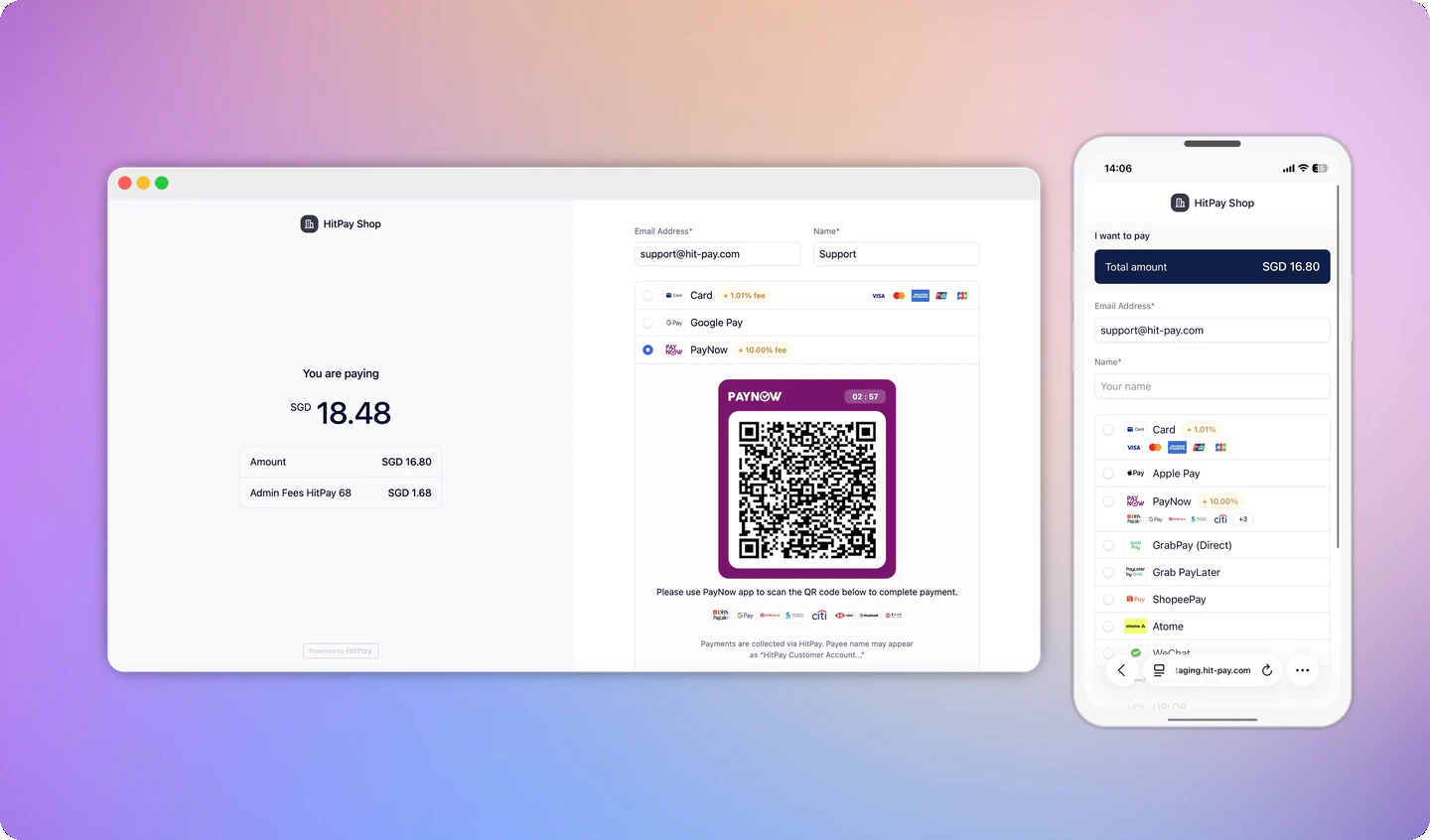
## Step 2: Presenting the Checkout UI
After the payment request is completed, your server must return the `payment_request_id` and URL values to the client. There are 2 ways to present the checkout UI: "Redirect to HitPay checkout" or "Present Drop-In UI."
Navigate your user to the URL, and HitPay will take care of the rest of the flow. Once the payment is completed, the user will be navigated back to the "redirect\_url" that was configured during the payment request step, along with the status.
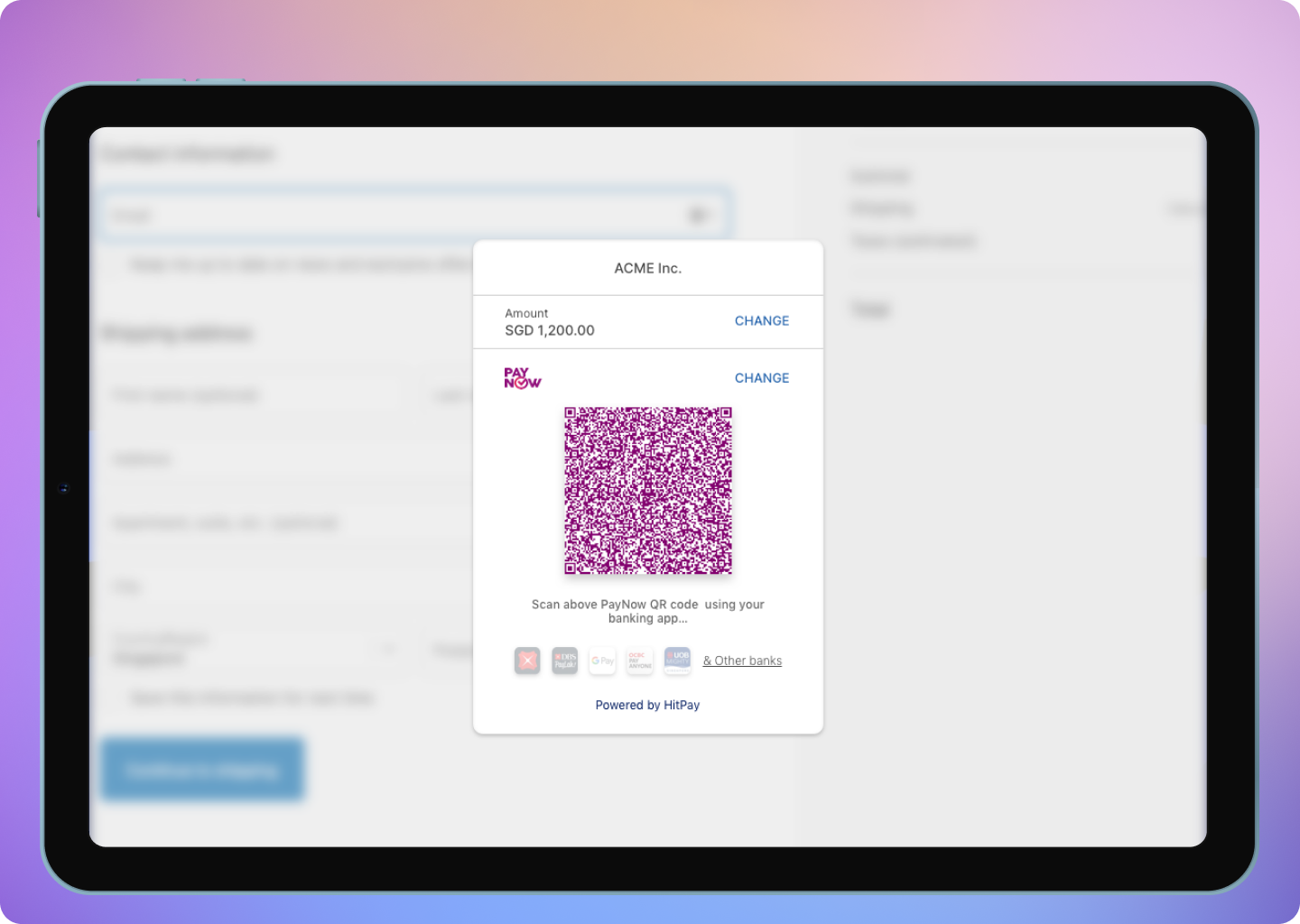
 Unlike the redirect checkout page, the drop-in is embedded into your webpage, so your customer will never have to leave your site. To present this, you will need 2 values: "default\_link" and "payment\_request\_id." The default link value can be found in your Dashboard > Payment Links > Default link, and this value is fixed for all your payments.
Sample code for Drop-In UI can be found [here](https://github.com/hit-pay/hitpay-js-example/blob/master/index.html).
Unlike the redirect checkout page, the drop-in is embedded into your webpage, so your customer will never have to leave your site. To present this, you will need 2 values: "default\_link" and "payment\_request\_id." The default link value can be found in your Dashboard > Payment Links > Default link, and this value is fixed for all your payments.
Sample code for Drop-In UI can be found [here](https://github.com/hit-pay/hitpay-js-example/blob/master/index.html).
 Drop-in UI currently does not support Apple Pay.
## Step 3: Handle Successful Payment
Once the payment is completed, the user will be redirected to the `redirect_url` defined in step 1. While you can use this redirect to show an "Order Success" screen to your users, you should not rely on it alone to mark orders as paid. The `redirect_url` can be triggered by anyone, so always use webhooks to securely confirm payment before fulfilling orders.
### What is a Webhook?
Webhook is a POST request sent from HitPay's server to your server about the payment confirmation. If you are using HitPay APIs to integrate into your e-commerce checkout, you must mark your order as paid ONLY after the webhook is received and validated.
### Register Your Webhook
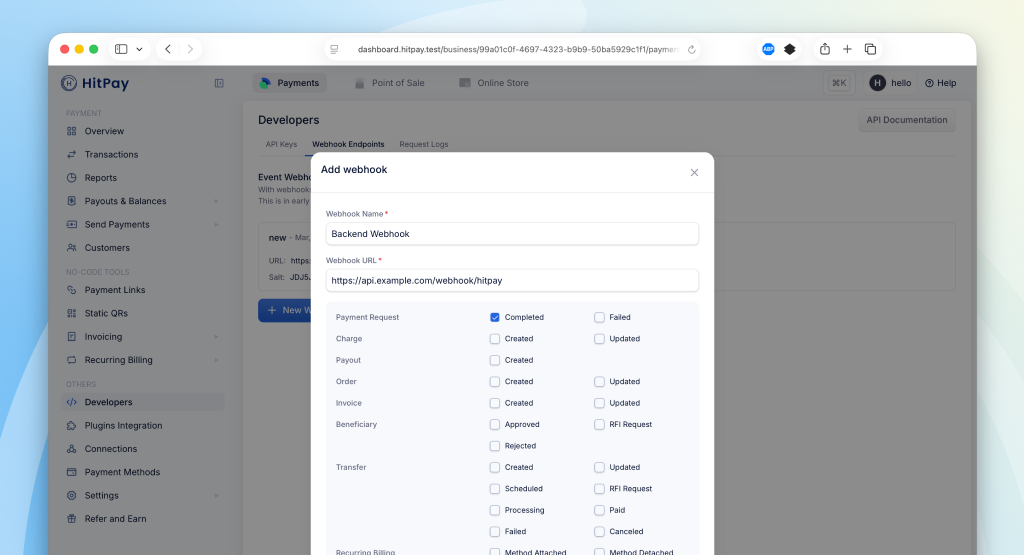
To receive payment notifications, you need to register a webhook URL from your HitPay Dashboard:
1. Navigate to **Developers > Webhook Endpoints** in your dashboard
2. Click on **New Webhook**
3. Enter a name and your webhook URL
4. Select the `payment_request.completed` event
5. Save your webhook configuration
Drop-in UI currently does not support Apple Pay.
## Step 3: Handle Successful Payment
Once the payment is completed, the user will be redirected to the `redirect_url` defined in step 1. While you can use this redirect to show an "Order Success" screen to your users, you should not rely on it alone to mark orders as paid. The `redirect_url` can be triggered by anyone, so always use webhooks to securely confirm payment before fulfilling orders.
### What is a Webhook?
Webhook is a POST request sent from HitPay's server to your server about the payment confirmation. If you are using HitPay APIs to integrate into your e-commerce checkout, you must mark your order as paid ONLY after the webhook is received and validated.
### Register Your Webhook
To receive payment notifications, you need to register a webhook URL from your HitPay Dashboard:
1. Navigate to **Developers > Webhook Endpoints** in your dashboard
2. Click on **New Webhook**
3. Enter a name and your webhook URL
4. Select the `payment_request.completed` event
5. Save your webhook configuration
 ### Webhook Payload
When a payment is completed, HitPay sends a JSON payload to your registered webhook URL with the following headers:
| HTTP Header | Description |
| ------------------- | ---------------------------------------------------------------- |
| Hitpay-Signature | HMAC-SHA256 signature of the JSON payload, using your salt value |
| Hitpay-Event-Type | `completed` |
| Hitpay-Event-Object | `payment_request` |
| User-Agent | `HitPay v2.0` |
### Sample Webhook Payload
```json theme={"system"}
{
"id": "9e9be41b-2866-4307-8621-e35c633c431f",
"name": "John Doe",
"email": "john@example.com",
"phone": "+6512345678",
"amount": "100.00",
"currency": "SGD",
"status": "completed",
"purpose": "Order #12345",
"reference_number": "REF123",
"payment_methods": ["card", "paynow_online"],
"url": "https://securecheckout.hit-pay.com/payment-request/@business/9e9be41b.../checkout",
"redirect_url": "https://example.com/success",
"created_at": "2025-04-06T15:17:21",
"updated_at": "2025-04-06T15:17:43",
"payments": [
{
"id": "9e9be41c-2869-4b8c-8701-6c44af86b7d0",
"status": "succeeded",
"buyer_email": "john@example.com",
"currency": "sgd",
"amount": "100.00",
"refunded_amount": "0.00",
"payment_type": "card",
"fees": "4.15",
"created_at": "2025-04-06T15:17:21",
"updated_at": "2025-04-06T15:17:43"
}
]
}
```
### Validating the Webhook
To ensure the webhook is authentic, validate the `Hitpay-Signature` header:
1. Receive the JSON payload and `Hitpay-Signature` from the request
2. Use your salt value (from the dashboard) as the secret key
3. Compute HMAC-SHA256 of the JSON payload using your salt
4. Compare the computed signature with `Hitpay-Signature` - they must match
```php PHP theme={"system"}
function validateWebhook($payload, $signature, $salt) {
$computedSignature = hash_hmac('sha256', $payload, $salt);
return hash_equals($computedSignature, $signature);
}
// Usage
$payload = file_get_contents('php://input');
$signature = $_SERVER['HTTP_HITPAY_SIGNATURE'];
$salt = 'your_salt_from_dashboard';
if (validateWebhook($payload, $signature, $salt)) {
$data = json_decode($payload, true);
// Process the payment confirmation
// Mark order as paid
} else {
http_response_code(401);
exit('Invalid signature');
}
```
```javascript NodeJS theme={"system"}
const crypto = require('crypto');
function validateWebhook(payload, signature, salt) {
const computedSignature = crypto
.createHmac('sha256', salt)
.update(payload)
.digest('hex');
return crypto.timingSafeEqual(
Buffer.from(computedSignature),
Buffer.from(signature)
);
}
// Usage in Express
app.post('/webhook', (req, res) => {
const payload = JSON.stringify(req.body);
const signature = req.headers['hitpay-signature'];
const salt = 'your_salt_from_dashboard';
if (validateWebhook(payload, signature, salt)) {
// Process the payment confirmation
// Mark order as paid
res.status(200).send('OK');
} else {
res.status(401).send('Invalid signature');
}
});
```
Congrats! You have now successfully completed the payment integration.
## FAQs
No. The `webhook` parameter in the payment request API is **deprecated** and should not be used.
Instead, register your webhook URL from the HitPay Dashboard:
1. Go to **Developers > Webhook Endpoints**
2. Click **New Webhook** and enter your URL
3. Subscribe to `payment_request.completed` and any other events you need
The dashboard-based webhook system supports JSON payloads, multiple event types (refunds, orders, invoices, transfers), and centralized management across all your payment requests.
Possible reasons for signature mismatch:
* Ensure you are using the correct salt value from the correct environment (Sandbox or Production)
* Make sure you are computing the HMAC-SHA256 of the raw JSON payload
* Verify the signature is being read from the `Hitpay-Signature` header
Possible reasons for this error:
* You are using a production key in the sandbox or a sandbox key in production. Make sure the API base URL is correct.
* You are missing headers. Ensure that you include both the 'Content-Type' and 'X-Requested-With' headers. Refer to this [section](/apis/guide/online-payments#authentication) again.
Ensure the following before moving to production
* Change the base URL for all API calls to [https://api.hit-pay.com/v1/](https://api.hit-pay.com/v1/)
* Finish paynow and other payment methods set up in production
* Update API keys and Salt values from the production dashboard
* If you are using Drop-In UI, update the default link to the production URL
HitPay enforces the following rate limits to ensure optimal performance and prevent abuse:
* **General API Rate Limit**: 400 requests per minute across all endpoints
* **Payment Request Endpoint**: 70 requests per minute (additional limit to prevent payment request misuse)
To avoid hitting rate limits and ensure reliable payment status updates, implement webhooks instead of polling the API for payment status. Use API status checks only as a fallback mechanism when webhooks fail.
### Webhook Payload
When a payment is completed, HitPay sends a JSON payload to your registered webhook URL with the following headers:
| HTTP Header | Description |
| ------------------- | ---------------------------------------------------------------- |
| Hitpay-Signature | HMAC-SHA256 signature of the JSON payload, using your salt value |
| Hitpay-Event-Type | `completed` |
| Hitpay-Event-Object | `payment_request` |
| User-Agent | `HitPay v2.0` |
### Sample Webhook Payload
```json theme={"system"}
{
"id": "9e9be41b-2866-4307-8621-e35c633c431f",
"name": "John Doe",
"email": "john@example.com",
"phone": "+6512345678",
"amount": "100.00",
"currency": "SGD",
"status": "completed",
"purpose": "Order #12345",
"reference_number": "REF123",
"payment_methods": ["card", "paynow_online"],
"url": "https://securecheckout.hit-pay.com/payment-request/@business/9e9be41b.../checkout",
"redirect_url": "https://example.com/success",
"created_at": "2025-04-06T15:17:21",
"updated_at": "2025-04-06T15:17:43",
"payments": [
{
"id": "9e9be41c-2869-4b8c-8701-6c44af86b7d0",
"status": "succeeded",
"buyer_email": "john@example.com",
"currency": "sgd",
"amount": "100.00",
"refunded_amount": "0.00",
"payment_type": "card",
"fees": "4.15",
"created_at": "2025-04-06T15:17:21",
"updated_at": "2025-04-06T15:17:43"
}
]
}
```
### Validating the Webhook
To ensure the webhook is authentic, validate the `Hitpay-Signature` header:
1. Receive the JSON payload and `Hitpay-Signature` from the request
2. Use your salt value (from the dashboard) as the secret key
3. Compute HMAC-SHA256 of the JSON payload using your salt
4. Compare the computed signature with `Hitpay-Signature` - they must match
```php PHP theme={"system"}
function validateWebhook($payload, $signature, $salt) {
$computedSignature = hash_hmac('sha256', $payload, $salt);
return hash_equals($computedSignature, $signature);
}
// Usage
$payload = file_get_contents('php://input');
$signature = $_SERVER['HTTP_HITPAY_SIGNATURE'];
$salt = 'your_salt_from_dashboard';
if (validateWebhook($payload, $signature, $salt)) {
$data = json_decode($payload, true);
// Process the payment confirmation
// Mark order as paid
} else {
http_response_code(401);
exit('Invalid signature');
}
```
```javascript NodeJS theme={"system"}
const crypto = require('crypto');
function validateWebhook(payload, signature, salt) {
const computedSignature = crypto
.createHmac('sha256', salt)
.update(payload)
.digest('hex');
return crypto.timingSafeEqual(
Buffer.from(computedSignature),
Buffer.from(signature)
);
}
// Usage in Express
app.post('/webhook', (req, res) => {
const payload = JSON.stringify(req.body);
const signature = req.headers['hitpay-signature'];
const salt = 'your_salt_from_dashboard';
if (validateWebhook(payload, signature, salt)) {
// Process the payment confirmation
// Mark order as paid
res.status(200).send('OK');
} else {
res.status(401).send('Invalid signature');
}
});
```
Congrats! You have now successfully completed the payment integration.
## FAQs
No. The `webhook` parameter in the payment request API is **deprecated** and should not be used.
Instead, register your webhook URL from the HitPay Dashboard:
1. Go to **Developers > Webhook Endpoints**
2. Click **New Webhook** and enter your URL
3. Subscribe to `payment_request.completed` and any other events you need
The dashboard-based webhook system supports JSON payloads, multiple event types (refunds, orders, invoices, transfers), and centralized management across all your payment requests.
Possible reasons for signature mismatch:
* Ensure you are using the correct salt value from the correct environment (Sandbox or Production)
* Make sure you are computing the HMAC-SHA256 of the raw JSON payload
* Verify the signature is being read from the `Hitpay-Signature` header
Possible reasons for this error:
* You are using a production key in the sandbox or a sandbox key in production. Make sure the API base URL is correct.
* You are missing headers. Ensure that you include both the 'Content-Type' and 'X-Requested-With' headers. Refer to this [section](/apis/guide/online-payments#authentication) again.
Ensure the following before moving to production
* Change the base URL for all API calls to [https://api.hit-pay.com/v1/](https://api.hit-pay.com/v1/)
* Finish paynow and other payment methods set up in production
* Update API keys and Salt values from the production dashboard
* If you are using Drop-In UI, update the default link to the production URL
HitPay enforces the following rate limits to ensure optimal performance and prevent abuse:
* **General API Rate Limit**: 400 requests per minute across all endpoints
* **Payment Request Endpoint**: 70 requests per minute (additional limit to prevent payment request misuse)
To avoid hitting rate limits and ensure reliable payment status updates, implement webhooks instead of polling the API for payment status. Use API status checks only as a fallback mechanism when webhooks fail.