> ## Documentation Index
> Fetch the complete documentation index at: https://docs.hitpayapp.com/llms.txt
> Use this file to discover all available pages before exploring further.
# Embedded Recurring APMs
> Set up recurring APM billing without redirecting customers away from your site — receive deep links or setup instructions inline via API.
## Overview
Keep customers on your site when they set up a recurring payment method. Instead of redirecting them to a HitPay-hosted page, pass a method-specific parameter (`generate_direct_link`, `generate_qr`, or `generate_instructions`) to receive a link, QR code, or setup instructions directly in the API response — ready to render in your own UI.
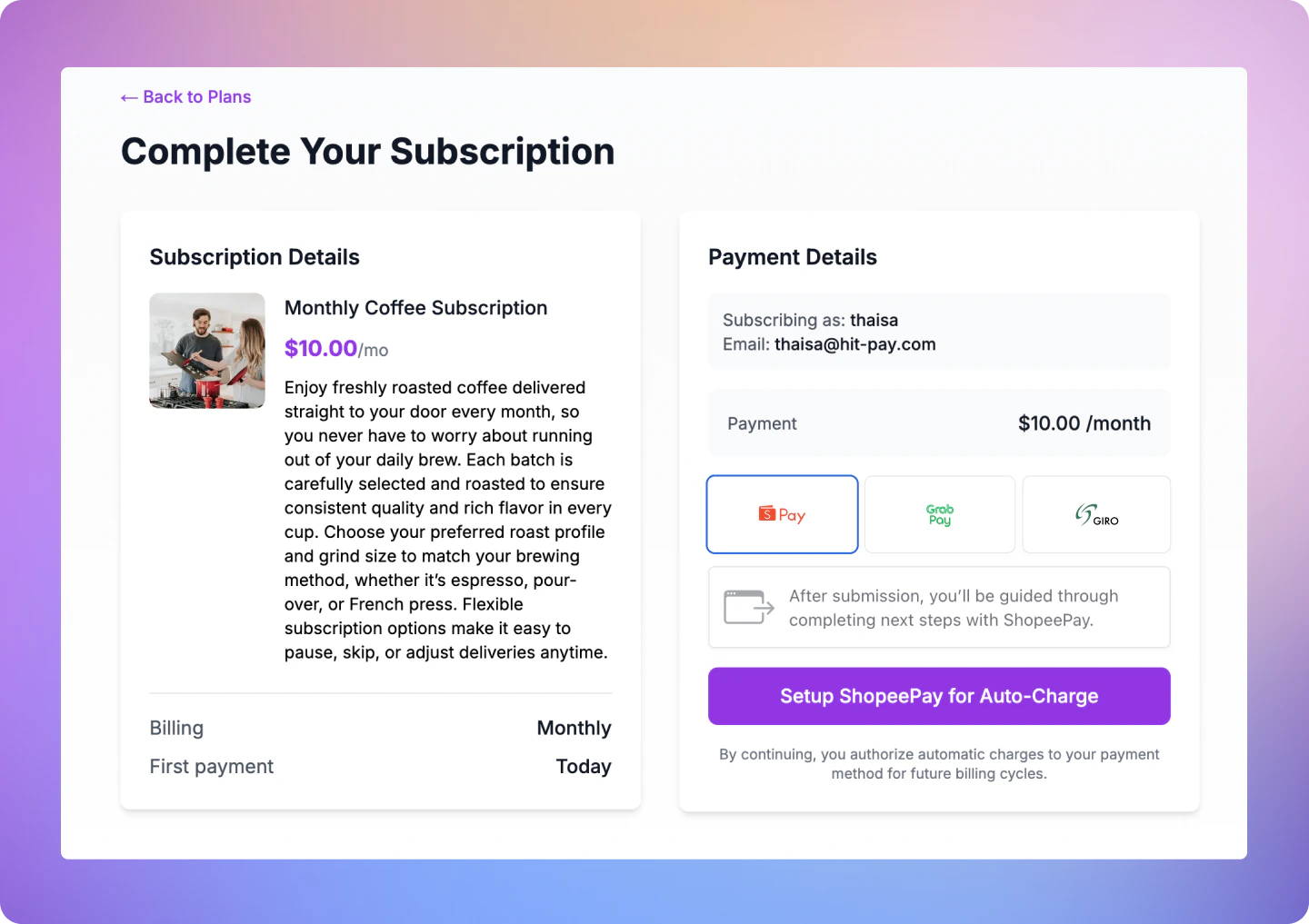 ## Supported Payment Methods
| Payment Method | Code | Parameter | Response type | Currencies |
| :------------- | :--------------- | :---------------------- | :----------------------------- | :------------ |
| ZaloPay | `zalopay` | `generate_qr` | `qr_code_data` | VND |
| Shopee Pay | `shopee_pay` | `generate_direct_link` | `direct_link` (web URL) | SGD, MYR, PHP |
| GrabPay | `grabpay_direct` | `generate_direct_link` | `direct_link` (web URL) | SGD, MYR |
| Touch 'N Go | `touch_n_go` | `generate_direct_link` | `direct_link` (web URL) | MYR |
| LINE Pay | `line_pay` | `generate_direct_link` | `direct_link` (LINE deep link) | THB |
| GIRO | `giro` | `generate_instructions` | `instructions` | SGD |
Send exactly one generate parameter per request (`generate_direct_link`, `generate_qr`, or `generate_instructions`). The parameter must match the payment method — sending `generate_qr` for `shopee_pay`, for example, returns a `400` error. Omitting all three generate parameters defaults to the hosted-page flow.
## How It Works
Call `POST /v1/recurring-billing` with exactly one generate parameter (`generate_direct_link`, `generate_qr`, or `generate_instructions`) and exactly one `payment_methods[]` entry. The API initiates the APM setup immediately and returns `qr_code_data`, `direct_link`, or `instructions` inline.
Render the returned data in your UI: show the link as a button or display the setup steps for GIRO.
The customer taps the link or follows the GIRO instructions.
HitPay fires `recurring_billing.method_attached` and `recurring_billing.subscription_updated` when the payment method is linked and the subscription activates. If a charge is made, `charge.created` is fired — listen to this event to confirm a successful payment.
***
## Step 1: Create a Recurring Billing
### Endpoint
```
POST /v1/recurring-billing
```
### Request Parameters
Send exactly one generate parameter per request. For redirect-based methods (`shopee_pay`, `grabpay_direct`, `touch_n_go`, `line_pay`), `redirect_url` is also required when using `generate_direct_link`. Sending more than one generate parameter returns a `400`.
| Parameter | Description | Example |
| :----------------------------------- | :---------------------------------------------------------------------------------------------------------------------------------------------------------------------------- | :--------------------------------------------------------- |
| `name` | Required. Name for this billing session. | Spotify Premium |
| `customer_email` | Required. Customer's email address. | [paul@hitpayapp.com](mailto:paul@hitpayapp.com) |
| `customer_name` | Optional. Customer's name. | Paul |
| `amount` | Optional when `payment_methods` contains only APMs (`zalopay`, `shopee_pay`, `grabpay_direct`, `touch_n_go`, `line_pay`) and `save_payment_method: true`. Required otherwise. | 9.90 |
| `save_payment_method` | Set to `true` to save the payment method. | true |
| `currency` | Currency code. | sgd |
| `payment_methods[]` | Required. Exactly one method per request. | grabpay\_direct |
| `generate_direct_link` | Set to `true` to receive a `direct_link` inline. Use with `shopee_pay`, `grabpay_direct`, `touch_n_go`, or `line_pay`. | true |
| `generate_qr` | Set to `true` to receive `qr_code_data` inline. Use with `zalopay`. | true |
| `generate_instructions` | Set to `true` to receive `instructions` inline. Use with `giro`. | true |
| `redirect_url` | Required when using `generate_direct_link`. Not required for `generate_qr` or `generate_instructions`. | [https://example.com/success](https://example.com/success) |
| `description` | Description shown to the customer. | Spotify Membership |
| `reference` | Your internal reference ID for this customer or session. | cust\_123 |
| `send_email` | Send email receipt to customer. Default: `false`. | true |
| `customer_phone_number` | Required for `shopee_pay`. Customer's phone number. | 91234567 |
| `customer_phone_number_country_code` | Required for `shopee_pay`. Country code of the phone number. | 65 |
### Example Requests
```shell Shopee Pay (Direct Link) theme={"system"}
curl --location --request POST 'https://api.sandbox.hit-pay.com/v1/recurring-billing' \
--header 'X-BUSINESS-API-KEY: your_api_key' \
--header 'X-Requested-With: XMLHttpRequest' \
--header 'Content-Type: application/x-www-form-urlencoded' \
--data-urlencode 'name=Spotify Premium' \
--data-urlencode 'customer_email=tan@example.com' \
--data-urlencode 'customer_name=Tan Ah Kow' \
--data-urlencode 'amount=9.90' \
--data-urlencode 'currency=sgd' \
--data-urlencode 'save_payment_method=true' \
--data-urlencode 'payment_methods[]=shopee_pay' \
--data-urlencode 'generate_direct_link=true' \
--data-urlencode 'customer_phone_number=91234567' \
--data-urlencode 'customer_phone_number_country_code=65' \
--data-urlencode 'redirect_url=https://merchant.com/billing/complete'
```
```shell ZaloPay (QR Code) theme={"system"}
curl --location --request POST 'https://api.sandbox.hit-pay.com/v1/recurring-billing' \
--header 'X-BUSINESS-API-KEY: your_api_key' \
--header 'X-Requested-With: XMLHttpRequest' \
--header 'Content-Type: application/x-www-form-urlencoded' \
--data-urlencode 'name=Spotify Premium' \
--data-urlencode 'customer_email=nguyen@example.com' \
--data-urlencode 'customer_name=Nguyen Van A' \
--data-urlencode 'amount=99000' \
--data-urlencode 'currency=vnd' \
--data-urlencode 'save_payment_method=true' \
--data-urlencode 'payment_methods[]=zalopay' \
--data-urlencode 'generate_qr=true'
```
```shell GIRO (Instructions) theme={"system"}
curl --location --request POST 'https://api.sandbox.hit-pay.com/v1/recurring-billing' \
--header 'X-BUSINESS-API-KEY: your_api_key' \
--header 'X-Requested-With: XMLHttpRequest' \
--header 'Content-Type: application/x-www-form-urlencoded' \
--data-urlencode 'name=Spotify Premium' \
--data-urlencode 'customer_email=lim@example.com' \
--data-urlencode 'customer_name=Lim Wei' \
--data-urlencode 'amount=9.90' \
--data-urlencode 'currency=sgd' \
--data-urlencode 'save_payment_method=true' \
--data-urlencode 'payment_methods[]=giro' \
--data-urlencode 'generate_instructions=true'
```
***
## Step 2: Present the Response in Your UI
The response includes all the standard recurring billing fields plus one of the following objects depending on the payment method.
### QR code (`qr_code_data`) — ZaloPay
Render the `qr_code` value as a scannable QR image in your UI.
```json theme={"system"}
{
"id": "9741164c-06a1-4dd7-a649-72cca8f9603c",
"customer_name": "Nguyen Van A",
"customer_email": "nguyen@example.com",
"name": "Spotify Premium",
"cycle": "save_card",
"cycle_repeat": null,
"cycle_frequency": null,
"currency": "vnd",
"amount": 99000,
"status": "scheduled",
"save_payment_method": 1,
"payment_methods": ["zalopay"],
"qr_code_data": {
"qr_code": "00020101021238570010A000000727...",
"qr_code_expiry": "2026-04-10T15:30:00"
},
"created_at": "2026-04-10T15:00:00",
"updated_at": null
}
```
| Field | Type | Description |
| :--------------- | :----- | :--------------------------------------------- |
| `qr_code` | string | QR code string to render as a scannable image. |
| `qr_code_expiry` | string | ISO 8601 timestamp when the QR code expires. |
### Direct link (`direct_link`) — Shopee Pay, GrabPay, Touch 'N Go
Render `direct_link_url` as a button (e.g. "Authorise with Shopee Pay"). On mobile, use `direct_link_app_url` to open the payment app directly if available.
```json theme={"system"}
{
"id": "9741164c-06a1-4dd7-a649-72cca8f9603a",
"customer_name": "Tan Ah Kow",
"customer_email": "tan@example.com",
"name": "Spotify Premium",
"cycle": "save_card",
"cycle_repeat": null,
"cycle_frequency": null,
"currency": "sgd",
"amount": 9.9,
"status": "scheduled",
"save_payment_method": 1,
"payment_methods": ["shopee_pay"],
"redirect_url": "https://merchant.com/billing/complete",
"direct_link": {
"direct_link_url": "https://shopeepay.sg/u/account-linking-agreement_sg?client_id=abc123...",
"direct_link_app_url": "shopeesg://main?apprl=%2Frn%2FTRANSFER_PAGE%3F...",
"expiry_time": null
},
"created_at": "2026-04-01T15:00:00",
"updated_at": "2026-04-01T15:00:00"
}
```
| Field | Type | Description |
| :-------------------- | :------------- | :----------------------------------------------------------------------------------------------------- |
| `direct_link_url` | string | Web redirect URL. Always present. Use this on desktop or as a fallback on mobile. |
| `direct_link_app_url` | string \| null | App deep link for mobile app-to-app flows. Present for Shopee Pay; `null` for GrabPay and Touch 'N Go. |
### Instructions (`instructions`) — GIRO
Display the steps as a numbered list. Make the `reference` value copyable so the customer can paste it into their banking portal.
```json theme={"system"}
{
"id": "9741164c-06a1-4dd7-a649-72cca8f9603b",
"customer_name": "Lim Wei",
"customer_email": "lim@example.com",
"name": "Spotify Premium",
"cycle": "save_card",
"cycle_repeat": null,
"cycle_frequency": null,
"currency": "sgd",
"amount": 9.9,
"status": "scheduled",
"save_payment_method": 1,
"payment_methods": ["giro"],
"instructions": {
"reference": "RPSHISXMB1E",
"steps": [
"Log in to your DBS/POSB Internet Banking Account on the Web",
"Click on Pay > Add GIRO Arrangement",
"Under Billing Organisation, select HitPay",
"Add RPSHISXMB1E as Bill Reference",
"Enter 0 under Payment Limit",
"Click on Next and hit Submit"
]
},
"created_at": "2026-04-01T15:00:00",
"updated_at": "2026-04-01T15:00:00"
}
```
| Field | Type | Description |
| :---------- | :-------- | :-------------------------------------------------------------- |
| `reference` | string | The bill reference the customer enters in their banking portal. |
| `steps` | string\[] | Ordered setup instructions. Display as a numbered list. |
***
## Step 3: Customer Completes Setup
Customer taps the link or is redirected to the provider's authorisation page, then returns to your `redirect_url`.
Customer logs in to DBS/POSB internet banking and follows the displayed steps. This may take 1–3 business days to activate.
***
## Step 4: Handle Webhooks
### Register Your Webhook
1. Navigate to **Developers > Webhook Endpoints** in your dashboard
2. Click **New Webhook**
3. Enter a name and your webhook URL
4. Select the events you want to receive:
* `recurring_billing.method_attached` — Payment method successfully linked
* `recurring_billing.subscription_updated` — Subscription status changes (e.g., `scheduled` → `active`)
* `charge.created` — A charge was successfully processed.
5. Save your webhook configuration
### Webhook Payload
When a payment is completed, HitPay sends a JSON payload to your registered webhook URL with the following headers:
| HTTP Header | Description |
| ------------------- | ---------------------------------------------------------------- |
| Hitpay-Signature | HMAC-SHA256 signature of the JSON payload, using your salt value |
| Hitpay-Event-Type | `completed` |
| Hitpay-Event-Object | `payment_request` |
| User-Agent | `HitPay v2.0` |
### Validating the Webhook
To ensure the webhook is authentic, validate the `Hitpay-Signature` header:
1. Receive the JSON payload and `Hitpay-Signature` from the request
2. Use your salt value (from the dashboard) as the secret key
3. Compute HMAC-SHA256 of the JSON payload using your salt
4. Compare the computed signature with `Hitpay-Signature` - they must match
```php PHP theme={"system"}
function validateWebhook($payload, $signature, $salt) {
$computedSignature = hash_hmac('sha256', $payload, $salt);
return hash_equals($computedSignature, $signature);
}
// Usage
$payload = file_get_contents('php://input');
$signature = $_SERVER['HTTP_HITPAY_SIGNATURE'];
$salt = 'your_salt_from_dashboard';
if (validateWebhook($payload, $signature, $salt)) {
$data = json_decode($payload, true);
// Process the payment confirmation
// Mark order as paid
} else {
http_response_code(401);
exit('Invalid signature');
}
```
```javascript NodeJS theme={"system"}
const crypto = require('crypto');
function validateWebhook(payload, signature, salt) {
const computedSignature = crypto
.createHmac('sha256', salt)
.update(payload)
.digest('hex');
return crypto.timingSafeEqual(
Buffer.from(computedSignature),
Buffer.from(signature)
);
}
// Usage in Express
app.post('/webhook', (req, res) => {
const payload = JSON.stringify(req.body);
const signature = req.headers['hitpay-signature'];
const salt = 'your_salt_from_dashboard';
if (validateWebhook(payload, signature, salt)) {
// Process the payment confirmation
// Mark order as paid
res.status(200).send('OK');
} else {
res.status(401).send('Invalid signature');
}
});
```
***
## FAQs
No. If you omit all three generate parameters, the API behaves exactly as before — returning the HitPay hosted page `url`. No migration required.
No. The method-specific generate parameters only work for supported APMs.
The API returns a `400` error. Send exactly one generate parameter per request.
The API returns a `400` error with a message indicating the correct parameter to use (e.g., `"shopee_pay does not support QR-based setup. Use generate_direct_link instead."`).
Existing webhook retry logic applies. You can also check the recurring billing status via `GET /v1/recurring-billing/{id}` — if the method is linked, `status` will be `active`.
* Change the base URL to `https://api.hit-pay.com/v1/`
* Update API keys and salt values from the production dashboard
* Ensure the APM provider is onboarded in your production account
* Register your webhook URL in production and subscribe to `recurring_billing.method_attached` and `recurring_billing.subscription_updated`
## Supported Payment Methods
| Payment Method | Code | Parameter | Response type | Currencies |
| :------------- | :--------------- | :---------------------- | :----------------------------- | :------------ |
| ZaloPay | `zalopay` | `generate_qr` | `qr_code_data` | VND |
| Shopee Pay | `shopee_pay` | `generate_direct_link` | `direct_link` (web URL) | SGD, MYR, PHP |
| GrabPay | `grabpay_direct` | `generate_direct_link` | `direct_link` (web URL) | SGD, MYR |
| Touch 'N Go | `touch_n_go` | `generate_direct_link` | `direct_link` (web URL) | MYR |
| LINE Pay | `line_pay` | `generate_direct_link` | `direct_link` (LINE deep link) | THB |
| GIRO | `giro` | `generate_instructions` | `instructions` | SGD |
Send exactly one generate parameter per request (`generate_direct_link`, `generate_qr`, or `generate_instructions`). The parameter must match the payment method — sending `generate_qr` for `shopee_pay`, for example, returns a `400` error. Omitting all three generate parameters defaults to the hosted-page flow.
## How It Works
Call `POST /v1/recurring-billing` with exactly one generate parameter (`generate_direct_link`, `generate_qr`, or `generate_instructions`) and exactly one `payment_methods[]` entry. The API initiates the APM setup immediately and returns `qr_code_data`, `direct_link`, or `instructions` inline.
Render the returned data in your UI: show the link as a button or display the setup steps for GIRO.
The customer taps the link or follows the GIRO instructions.
HitPay fires `recurring_billing.method_attached` and `recurring_billing.subscription_updated` when the payment method is linked and the subscription activates. If a charge is made, `charge.created` is fired — listen to this event to confirm a successful payment.
***
## Step 1: Create a Recurring Billing
### Endpoint
```
POST /v1/recurring-billing
```
### Request Parameters
Send exactly one generate parameter per request. For redirect-based methods (`shopee_pay`, `grabpay_direct`, `touch_n_go`, `line_pay`), `redirect_url` is also required when using `generate_direct_link`. Sending more than one generate parameter returns a `400`.
| Parameter | Description | Example |
| :----------------------------------- | :---------------------------------------------------------------------------------------------------------------------------------------------------------------------------- | :--------------------------------------------------------- |
| `name` | Required. Name for this billing session. | Spotify Premium |
| `customer_email` | Required. Customer's email address. | [paul@hitpayapp.com](mailto:paul@hitpayapp.com) |
| `customer_name` | Optional. Customer's name. | Paul |
| `amount` | Optional when `payment_methods` contains only APMs (`zalopay`, `shopee_pay`, `grabpay_direct`, `touch_n_go`, `line_pay`) and `save_payment_method: true`. Required otherwise. | 9.90 |
| `save_payment_method` | Set to `true` to save the payment method. | true |
| `currency` | Currency code. | sgd |
| `payment_methods[]` | Required. Exactly one method per request. | grabpay\_direct |
| `generate_direct_link` | Set to `true` to receive a `direct_link` inline. Use with `shopee_pay`, `grabpay_direct`, `touch_n_go`, or `line_pay`. | true |
| `generate_qr` | Set to `true` to receive `qr_code_data` inline. Use with `zalopay`. | true |
| `generate_instructions` | Set to `true` to receive `instructions` inline. Use with `giro`. | true |
| `redirect_url` | Required when using `generate_direct_link`. Not required for `generate_qr` or `generate_instructions`. | [https://example.com/success](https://example.com/success) |
| `description` | Description shown to the customer. | Spotify Membership |
| `reference` | Your internal reference ID for this customer or session. | cust\_123 |
| `send_email` | Send email receipt to customer. Default: `false`. | true |
| `customer_phone_number` | Required for `shopee_pay`. Customer's phone number. | 91234567 |
| `customer_phone_number_country_code` | Required for `shopee_pay`. Country code of the phone number. | 65 |
### Example Requests
```shell Shopee Pay (Direct Link) theme={"system"}
curl --location --request POST 'https://api.sandbox.hit-pay.com/v1/recurring-billing' \
--header 'X-BUSINESS-API-KEY: your_api_key' \
--header 'X-Requested-With: XMLHttpRequest' \
--header 'Content-Type: application/x-www-form-urlencoded' \
--data-urlencode 'name=Spotify Premium' \
--data-urlencode 'customer_email=tan@example.com' \
--data-urlencode 'customer_name=Tan Ah Kow' \
--data-urlencode 'amount=9.90' \
--data-urlencode 'currency=sgd' \
--data-urlencode 'save_payment_method=true' \
--data-urlencode 'payment_methods[]=shopee_pay' \
--data-urlencode 'generate_direct_link=true' \
--data-urlencode 'customer_phone_number=91234567' \
--data-urlencode 'customer_phone_number_country_code=65' \
--data-urlencode 'redirect_url=https://merchant.com/billing/complete'
```
```shell ZaloPay (QR Code) theme={"system"}
curl --location --request POST 'https://api.sandbox.hit-pay.com/v1/recurring-billing' \
--header 'X-BUSINESS-API-KEY: your_api_key' \
--header 'X-Requested-With: XMLHttpRequest' \
--header 'Content-Type: application/x-www-form-urlencoded' \
--data-urlencode 'name=Spotify Premium' \
--data-urlencode 'customer_email=nguyen@example.com' \
--data-urlencode 'customer_name=Nguyen Van A' \
--data-urlencode 'amount=99000' \
--data-urlencode 'currency=vnd' \
--data-urlencode 'save_payment_method=true' \
--data-urlencode 'payment_methods[]=zalopay' \
--data-urlencode 'generate_qr=true'
```
```shell GIRO (Instructions) theme={"system"}
curl --location --request POST 'https://api.sandbox.hit-pay.com/v1/recurring-billing' \
--header 'X-BUSINESS-API-KEY: your_api_key' \
--header 'X-Requested-With: XMLHttpRequest' \
--header 'Content-Type: application/x-www-form-urlencoded' \
--data-urlencode 'name=Spotify Premium' \
--data-urlencode 'customer_email=lim@example.com' \
--data-urlencode 'customer_name=Lim Wei' \
--data-urlencode 'amount=9.90' \
--data-urlencode 'currency=sgd' \
--data-urlencode 'save_payment_method=true' \
--data-urlencode 'payment_methods[]=giro' \
--data-urlencode 'generate_instructions=true'
```
***
## Step 2: Present the Response in Your UI
The response includes all the standard recurring billing fields plus one of the following objects depending on the payment method.
### QR code (`qr_code_data`) — ZaloPay
Render the `qr_code` value as a scannable QR image in your UI.
```json theme={"system"}
{
"id": "9741164c-06a1-4dd7-a649-72cca8f9603c",
"customer_name": "Nguyen Van A",
"customer_email": "nguyen@example.com",
"name": "Spotify Premium",
"cycle": "save_card",
"cycle_repeat": null,
"cycle_frequency": null,
"currency": "vnd",
"amount": 99000,
"status": "scheduled",
"save_payment_method": 1,
"payment_methods": ["zalopay"],
"qr_code_data": {
"qr_code": "00020101021238570010A000000727...",
"qr_code_expiry": "2026-04-10T15:30:00"
},
"created_at": "2026-04-10T15:00:00",
"updated_at": null
}
```
| Field | Type | Description |
| :--------------- | :----- | :--------------------------------------------- |
| `qr_code` | string | QR code string to render as a scannable image. |
| `qr_code_expiry` | string | ISO 8601 timestamp when the QR code expires. |
### Direct link (`direct_link`) — Shopee Pay, GrabPay, Touch 'N Go
Render `direct_link_url` as a button (e.g. "Authorise with Shopee Pay"). On mobile, use `direct_link_app_url` to open the payment app directly if available.
```json theme={"system"}
{
"id": "9741164c-06a1-4dd7-a649-72cca8f9603a",
"customer_name": "Tan Ah Kow",
"customer_email": "tan@example.com",
"name": "Spotify Premium",
"cycle": "save_card",
"cycle_repeat": null,
"cycle_frequency": null,
"currency": "sgd",
"amount": 9.9,
"status": "scheduled",
"save_payment_method": 1,
"payment_methods": ["shopee_pay"],
"redirect_url": "https://merchant.com/billing/complete",
"direct_link": {
"direct_link_url": "https://shopeepay.sg/u/account-linking-agreement_sg?client_id=abc123...",
"direct_link_app_url": "shopeesg://main?apprl=%2Frn%2FTRANSFER_PAGE%3F...",
"expiry_time": null
},
"created_at": "2026-04-01T15:00:00",
"updated_at": "2026-04-01T15:00:00"
}
```
| Field | Type | Description |
| :-------------------- | :------------- | :----------------------------------------------------------------------------------------------------- |
| `direct_link_url` | string | Web redirect URL. Always present. Use this on desktop or as a fallback on mobile. |
| `direct_link_app_url` | string \| null | App deep link for mobile app-to-app flows. Present for Shopee Pay; `null` for GrabPay and Touch 'N Go. |
### Instructions (`instructions`) — GIRO
Display the steps as a numbered list. Make the `reference` value copyable so the customer can paste it into their banking portal.
```json theme={"system"}
{
"id": "9741164c-06a1-4dd7-a649-72cca8f9603b",
"customer_name": "Lim Wei",
"customer_email": "lim@example.com",
"name": "Spotify Premium",
"cycle": "save_card",
"cycle_repeat": null,
"cycle_frequency": null,
"currency": "sgd",
"amount": 9.9,
"status": "scheduled",
"save_payment_method": 1,
"payment_methods": ["giro"],
"instructions": {
"reference": "RPSHISXMB1E",
"steps": [
"Log in to your DBS/POSB Internet Banking Account on the Web",
"Click on Pay > Add GIRO Arrangement",
"Under Billing Organisation, select HitPay",
"Add RPSHISXMB1E as Bill Reference",
"Enter 0 under Payment Limit",
"Click on Next and hit Submit"
]
},
"created_at": "2026-04-01T15:00:00",
"updated_at": "2026-04-01T15:00:00"
}
```
| Field | Type | Description |
| :---------- | :-------- | :-------------------------------------------------------------- |
| `reference` | string | The bill reference the customer enters in their banking portal. |
| `steps` | string\[] | Ordered setup instructions. Display as a numbered list. |
***
## Step 3: Customer Completes Setup
Customer taps the link or is redirected to the provider's authorisation page, then returns to your `redirect_url`.
Customer logs in to DBS/POSB internet banking and follows the displayed steps. This may take 1–3 business days to activate.
***
## Step 4: Handle Webhooks
### Register Your Webhook
1. Navigate to **Developers > Webhook Endpoints** in your dashboard
2. Click **New Webhook**
3. Enter a name and your webhook URL
4. Select the events you want to receive:
* `recurring_billing.method_attached` — Payment method successfully linked
* `recurring_billing.subscription_updated` — Subscription status changes (e.g., `scheduled` → `active`)
* `charge.created` — A charge was successfully processed.
5. Save your webhook configuration
### Webhook Payload
When a payment is completed, HitPay sends a JSON payload to your registered webhook URL with the following headers:
| HTTP Header | Description |
| ------------------- | ---------------------------------------------------------------- |
| Hitpay-Signature | HMAC-SHA256 signature of the JSON payload, using your salt value |
| Hitpay-Event-Type | `completed` |
| Hitpay-Event-Object | `payment_request` |
| User-Agent | `HitPay v2.0` |
### Validating the Webhook
To ensure the webhook is authentic, validate the `Hitpay-Signature` header:
1. Receive the JSON payload and `Hitpay-Signature` from the request
2. Use your salt value (from the dashboard) as the secret key
3. Compute HMAC-SHA256 of the JSON payload using your salt
4. Compare the computed signature with `Hitpay-Signature` - they must match
```php PHP theme={"system"}
function validateWebhook($payload, $signature, $salt) {
$computedSignature = hash_hmac('sha256', $payload, $salt);
return hash_equals($computedSignature, $signature);
}
// Usage
$payload = file_get_contents('php://input');
$signature = $_SERVER['HTTP_HITPAY_SIGNATURE'];
$salt = 'your_salt_from_dashboard';
if (validateWebhook($payload, $signature, $salt)) {
$data = json_decode($payload, true);
// Process the payment confirmation
// Mark order as paid
} else {
http_response_code(401);
exit('Invalid signature');
}
```
```javascript NodeJS theme={"system"}
const crypto = require('crypto');
function validateWebhook(payload, signature, salt) {
const computedSignature = crypto
.createHmac('sha256', salt)
.update(payload)
.digest('hex');
return crypto.timingSafeEqual(
Buffer.from(computedSignature),
Buffer.from(signature)
);
}
// Usage in Express
app.post('/webhook', (req, res) => {
const payload = JSON.stringify(req.body);
const signature = req.headers['hitpay-signature'];
const salt = 'your_salt_from_dashboard';
if (validateWebhook(payload, signature, salt)) {
// Process the payment confirmation
// Mark order as paid
res.status(200).send('OK');
} else {
res.status(401).send('Invalid signature');
}
});
```
***
## FAQs
No. If you omit all three generate parameters, the API behaves exactly as before — returning the HitPay hosted page `url`. No migration required.
No. The method-specific generate parameters only work for supported APMs.
The API returns a `400` error. Send exactly one generate parameter per request.
The API returns a `400` error with a message indicating the correct parameter to use (e.g., `"shopee_pay does not support QR-based setup. Use generate_direct_link instead."`).
Existing webhook retry logic applies. You can also check the recurring billing status via `GET /v1/recurring-billing/{id}` — if the method is linked, `status` will be `active`.
* Change the base URL to `https://api.hit-pay.com/v1/`
* Update API keys and salt values from the production dashboard
* Ensure the APM provider is onboarded in your production account
* Register your webhook URL in production and subscribe to `recurring_billing.method_attached` and `recurring_billing.subscription_updated`